
Operating Instructions Function Parameters




36
Chapter 3 Copier Settings
Key Operator
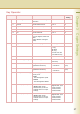
No. Parameter Comments Selective Item
Standard
Setting
0 - 9 00 Print Copier Settings Print a Copier Settings list.
To cancel printing the copier
setting list, press “Stop” and “OK”.
While processing the cancellation,
panel operation is denied, and an
error beep is produced.
The feeding paper(s) will be
ejected before completing the
above cancellation operation.
If setting a parameter, an asterisk
mark (*) will be added before the
parameter number.
Stop, Start Start
01 Paper Size Priority Set the paper size priority.
A3 , B4 , A4 ,
A4 , B5 , B5 ,
A5 , 11x17 ,
Legal , 8.5x11 ,
8.5x11 , 5.5x8.5 ,
8x13 , 8.5x13
A4
02 Original Mode Default Set the default Original Type of
the quality adjustment.
• Text:
Text1 (Printed),
Text2 (Pencil)
• Text/Photo:
T/P1 (Commercial),
T/P2 (Photo Paper),
T/P3 (Laser Printed)
• Photo:
Photo1 (Commercial),
Photo2 (Photo Paper),
Photo3 (Laser Printed)
• Other Types:
Other1 (Map),
Other2 (Tracing Paper),
Other3 (News Paper)
Te x t 1 , Te x t 2 , T / P 1,
T/P2, T/P3, Photo1,
Photo2, Photo3,
Other1, Other2,
Other3
T/P1
03 Colour Mode Default Set the default Colour Mode. Auto, Black, Colour,
2Colour, 1Colour
Auto
04 Text Density When Original Mode is “Text”,
set the default density.
-3 to +3 0
05 T/P Density When Original Mode is “Text/
Photo”, set the default density.
-3 to +3 0
06 Photo Density When Original Mode is “Photo”,
set the default density.
-3 to +3 0
07 Density (Other Type) When Original Mode is “Other
Types”, set the default density.
-3 to +3 0
08 Overlay Density Set the default density for
overlay copying.
-3 to +3 0
09 Background Removal Set the default Background
Removal.
Off, Level:1 to Level:6 Level:3