
Operating Instructions Function Parameters




34
Chapter 3 Copier Settings
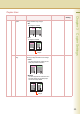
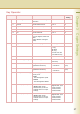
5 - 9 08 Digital Skyshot
Mode
Enable or disable Digital Skyshot Mode.
•No
Digital Skyshot Mode is disabled.
•Normal
Skyshot is used with standard quality.
• Quality
Skyshot is used with better quality than
in “Normal”.
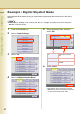
z Refer to Example : Digital Skyshot
Mode (see page 40).
No, Normal, Quality Normal
09 Manual Skyshot
Mode
Enable or disable Manual Skyshot Mode.
•Off
Manual Skyshot Mode is disabled.
•M1,On
The image is copied in pre-registered M1
size.
(Standard setting : 70x160mm)
•M2,On
The image is copied in pre-registered M2
size.
(Standard setting : 95x220mm)
•M1,M2,On
Copied in pre-registered M1 or M2 size.
z Refer to Example : Manual Skyshot
Mode (see page 41).
Off,
M1,On,
M2,On,
M1,M2,On
Off
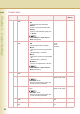
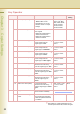
10 - 14 10 G-Cl. Detect
Mode
Set the ground colour detection mode. Tip, Area Tip
11 Sort Priority ADF Select the sort priority when using the ADF.
z Shift, Staple, Group
When the optional paper Transport Unit
is outer, this setting is available.
None, Sort, Shift,
Staple, Group, Rotate
Sort
12 Sort Priority Glass Select the sort priority when using the
Platen.
z Shift, Staple, Group
When the optional paper Transport Unit
is outer, this setting is available.
None, Sort, Shift,
Staple, Group, Rotate
None
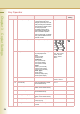
13 Stamping Default
Mode
Set the default Stamping Mode. Page, Date, Issue,
Tex t
Page
14 Page Numbering
Style
Set the page numbering style. -n-,
n/m
-n-
Copier User
No. Parameter Comments Selective Item Standard
Setting