
Operating Instructions Function Parameters



32
Chapter 3 Copier Settings
Chapter 3
Copier Settings
Copier Settings
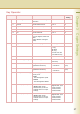
In Copier User Mode, the following items can be changed.
Copier User
No. Parameter Comments Selective Item Standard
Setting
0 - 4 00 Margin Value
Default
Set the default margin. 5 mm, 10 mm, 15
mm, 20 mm
10 mm
01 Edge Value
Default
Set the default edge. 5 mm, 10 mm, 15
mm, 20 mm
5 mm
02 Book Value
Default
Set the default book. 15 mm, 20 mm, 25
mm, 30 mm
20 mm
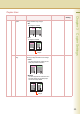
03 Margin Reduction
Def.
To copy with the binding margin, set
whether to reduce the copy image.
No, Yes No
•No
The margin is not reduced.
If the zoom ratio is 50% or less, the margin is reduced with the
copy image.
•Yes
The margin is reduced with the copy image.
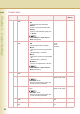
04 2-Sided Mode
Default
Set the default 2-sided Mode. No, 1 to 2, 2 to 2,
B to 2
No
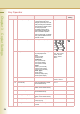
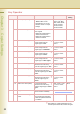
5 - 9 05 N in 1 Default
Mode
Set the default N in 1 Mode. 2 in 1, 4 in 1, 8 in 1 2 in 1