
Operating Instructions Function Parameters

26
Chapter 2 General Settings
Changing the Maximum Prints
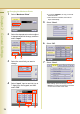
1
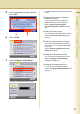
Select “Maximum Prints”.
2
Select the department number subject
to departmental limit change, and then
select “Input”.
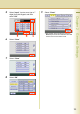
3
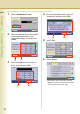
Select the count limit you want to
change.
4
Select “Input”, input a new limit (up to
7 digits) from the keypad, and then
select “OK”.
z If you input “9999999”, the copy count limit
becomes infinite.
z If the set limit is exceeded, the machine
stops automatically.
5
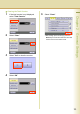
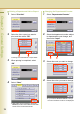
Select “Close”.
6
Select “OK”.
7
Select “Close”.
z After setting up the function(s), press the
Reset key to return the machine to the initial
screen of the current active mode.