
Operating Instructions - Function Parameters

9
Chapter 1 Before Starting
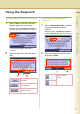
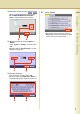
Entering a number by using or
Select or , and then select “OK”.
Ex: When setting “40 Fold Position(A3/
LDR)” in General Settings (see page 14).
Selecting a value by using “Lighter” or
“Darker”
Select “Lighter” or “Darker”, and then select
“OK”.
Ex: When setting “04 Text Density” in Copier
Settings (see page 22).
Entering characters
Enter characters, and then select “OK”.
Ex: When setting “15 LDAP Server Name” in
Fax/Email Settings (see pages 30, 46 and 47)
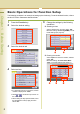
6
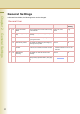
Select “Close”.
z After setting up the function(s), press the
Reset key to return the machine to the initial
screen of the current active mode.