
Operating Instructions - Function Parameters

70
Chapter 6 Printer Settings
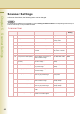
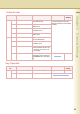
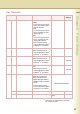
24 Selected Frame Type The machine detects and
display the Frame Type on the
Touch Panel.
z Frame Type is displayed only,
but cannot be set.
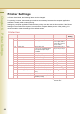
15-29 25 NetWare Mode Select NetWare mode.
•Pserver
The machine is used as Print
Server and prints the waiting
job stored in the machine.
•Rprinter
The machine is used as
Remote Printer and prints
data which is sent from Print
Server.
Pserver, Rprinter Pserver
26 NetWare Printer Name Set the NetWare printer name. Up to 31 characters
27 Print Server Name Set the print server name. Up to 31 characters
28 Print Server Password Set the print server password. Up to 31 characters
29 Job Polling Time Set the job polling time.
Select “Input” and enter the job
polling time.
2-255 (Sec) 4 (Sec)
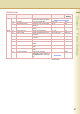
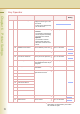
30-44 30 Bindery Mode Set Bindery Mode when using
the NetWare.
Off, On Off
31 File Server Name 1 Set file server names. Up to
eight names can be set.
Up to 31 characters
32 File Server Name 2
33 File Server Name 3
34 File Server Name 4
35 File Server Name 5
36 File Server Name 6
37 File Server Name 7
38 File Server Name 8
39 NDS Tree Set the tree. Up to 31 characters
40 NDS Context Set the context. Up to 77 characters
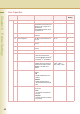
No. 25 to 40
After setting, turn themachine’s power switch
Off, and then On again.
Key Operator
No. Parameter Comments Selective Item Standard
Setting