
Operating Instructions - Function Parameters

7
Chapter 1 Before Starting
Using the Keyboard
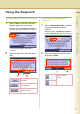
Enter Letters in Uppercase / Lowercase
1
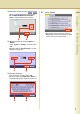
Select “Caps” to shift the characters
between uppercase / lowercase.
Ex: When setting “15 LDAP Server Name” in
Fax/Email Settings (see pages 30, 46 and 47).
z In the Standard Setting, lowercase is
selected.
2
Enter the characters, and then select
“OK”.
Enter Numeric Characters and
Symbols
1
Select “Numeric/Symbols” to shift the
characters between numbers /
symbols.
Ex: When setting “15 LDAP Server Name” in
Fax/Email Settings (see pages 30, 46 and 47)
2
Enter the numbers or symbols, and
then select “Close”.
To input a space between
characters.
To move the cursor to the
left or right side.
To erase the character
before the cursor.
To shift the entry screen
between numbers /
symbols.