
Operating Instructions - Function Parameters

69
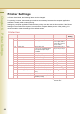
Chapter 6 Printer Settings
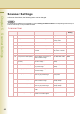
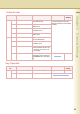
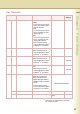
0-14 14 Printer Language Set a printer language.
•Auto
The machine prints received
data by automatically judging
its printer language.
•PCL
The machine prints received
data by regarding its printer
language as PCL.
•PS
The machine prints received
data by regarding its printer
language as PostScript.
z When the optional Printer
Controller Module (for Adobe
®
PostScript
®
3
™
)is installed.
Auto, PCL, PS Auto
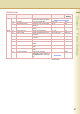
15-29 18 AppleTalk Set “On” to use AppleTalk.
z When the optional Printer
Controller Module (for Adobe
®
PostScript
®
3
™
)is installed.
Off, On On
19 AppleTalk Zone Name Set the AppleTalk zone name.
z When the optional Printer
Controller Module (for Adobe
®
PostScript
®
3
™
)is installed.
Up to 31 characters
20 AppleTalk Printer Name Set the AppleTalk printer
name.
z When the optional Printer
Controller Module (for Adobe
®
PostScript
®
3
™
)is installed.
Up to 31 characters
21 AppleTalk Type Name The machine detects and
display the AppleTalk Type
Name on the Touch Panel.
z Apple Talk Type Name is
displayed only, but cannot
be set.
z When the optional Printer
Controller Module (for Adobe
®
PostScript
®
3
™
)is installed.
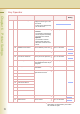
22 NetWare Set “On” to use NetWare. Off, On Off
23 NetWare Frame Type Set the NetWare frame type. 802.3, 802.2, Ether-II,
SNAP
802.2
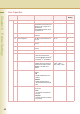
No. 18 to 23
After setting, turn themachine’s power switch
Off, and then On again.
Key Operator
No. Parameter Comments Selective Item Standard
Setting