
Operating Instructions - Function Parameters

68
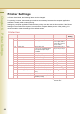
Chapter 6 Printer Settings
Key Operator
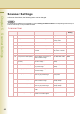
No. Parameter Comments Selective Item Standard
Setting
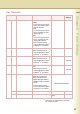
0-14 00 Print Printer Settings Print a Printer Settings list. Stop, Start Start
01 Job Completion Time Set the time-out period if the
machine does not receive a print
signal from the computer for a
specified time.
Select “Input” and enter the job
completion time.
1 to 999 (Sec) 180 (Sec)
02 Page Protection Set value to “On” to use page
protection.
Off, On Off
03 Error Page Print Set “On” to print the data of an
error job.
Off, On On
04 Spool Function Set “On” to set the spool
function.
Off, On On
05 Text Print Set “On” to print a text with no
pictures.
Off, On On
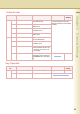
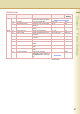
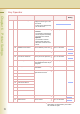
07 Font List Print (PCL) Print the PCL font list. Stop, Start Stop
08 Font List Print (PS) Print the PS font list.
z When the optional Printer
Controller Module (for Adobe
®
PostScript
®
3
™
)is installed.
Stop, Start Stop
09 Mailbox Data Holding When the optional hard disk is
installed, set the limit of storing
the data in the mailbox. When
“Infinity” is set, data is not
deleted.
Infinity, 1 day, 2 days,
3 days, 4 days, 5
days, 6 days, 7 days
7 days
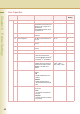
10 Delete Mailbox Data Select the mailbox data to be
deleted.
•All
All data is deleted from the
mailbox.
•Before
Deletes the data which is
received before the specified
date.
All, Before Before
11 Print Queue Delete Set the person who can delete
the print job.
•Free
Any operator can delete the
print job.
•Key Op.
Only Key Operator can delete
the print job.
Free, Key Op. Key Op.