
Operating Instructions - Function Parameters

64
Chapter 5 Scanner Settings
Chapter 5
Scanner Settings
Scanner Settings
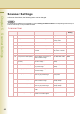
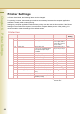
In Scanner User Mode, the following items can be changed.
For details about address book registration, refer to Editing the Address Book in the Operating Instructions (For
Scanner and Email) on the provided CD-ROM.
Scanner User
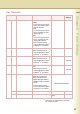
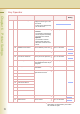
No. Parameter Comments Selective Item Standard
Setting
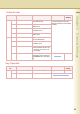
0-9 00 Print Scanner Addr List Print a Scanner Addr List. Stop, Start Start
01 Original Mode Default Set the default of Original Mode. Text, T/P (Text/
Photo), Photo
T/P
02 Colour Mode Default Set the default of Colour Mode. Colour, Grey, Black Colour
03 Density Default Set the default density. -3 to +3 0
04 Background Removal Set the default of Background
Removal.
Background Removal :
Off, Level1 to Level6
Level3
05 Contrast Default Set the default contrast. -3 to +3 0
06 Compression Mode (Black) Set the default compression of
black-and-white image.
MH, MR, MMR, JBIG MMR
07 Compression Mode
(Colour)
Set the default compression of
full-colour image.
Standard, Speed,
Quality
Standard
08 Compress. Mode (Grey) Set the default compression of
grey-scale image.
Standard, Speed,
Quality
Standard
09 File Type (Black) Set the default file type of black-
and-white image.
TIFF, PDF PDF
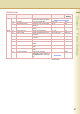
10-19 10 File Type (Colour / Grey) Set the default file type of full-
colour or grey-scale image.
JPEG, PDF,
Comp. PDF
JPEG
11 Resolution Def. (BK) Set the default resolution of
black-and-white image.
200dpi, 300dpi,
400dpi, 600dpi
300dpi
12 Resolution Def. (Cl/Gr) Set the default resolution of
colour or grey-scale image.
200dpi, 300dpi,
400dpi, 600dpi
200dpi
13 Job Build and SADF Mode Set the default of Job Build and
SADF.
No, Yes No
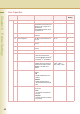
14 2-Side Orig. Bound Edge Set the default bounding
position on 2-sided original.
Long, Short Long