
Operating Instructions - Function Parameters

39
Chapter 4 Fax/Email Settings
80-119
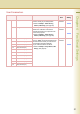
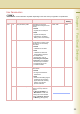
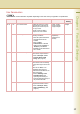
118 Fax Function Detect Enable the machine to switch
automatically to Fax Mode by
detecting fax number input on
the copy screen.
Set the number of digits to
interpret it as a fax number.
Invalid, 4-Digits,
5-Digits, 6-Digits,
7-Digits, 8-Digits
6-Digits
131 Job Tracking Set the Job Tracking under the
following conditions.
z When the optional Internet Fax
and Network Scanner are
installed.
z When “75 User
Authentication” in General
Settings is set to “Fax(On)” or
“Scan(On)”, and “54 Fax
Forward” in Fax Parameters is
set to “Invalid”.
None, Tx(Send),
Rx(Receive),
Tx&Rx(Send &
Receive)
None
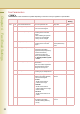
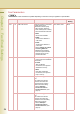
120-159
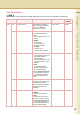
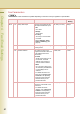
140 LAN RLY XMT Request Enable or disable the LAN relay
transmission request function.
z Refer to Example : Initial
Sending Station (LAN
Relay). (See page 56)
Invalid, Valid Invalid
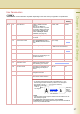
141 LAN XMT Reduce Enable or disable reduced
transmission when transmitting
a large sized original via Internet
Fax.
When set to “Valid”, a A3/
Ledger/B4 sized original is
reduced and transmitted as A4/
Letter sized paper.
z Refer to Emailing an A3-
Sized Document in the
Operating Instructions (For
Facsimile and Internet Fax) on
the provided CD-ROM.
Invalid, Valid Invalid
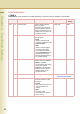
142 Relay XMT Enable or disable the LAN
relayed transmission function.
z Refer to Example : Relay
Station (LAN Relay). (See
page 60)
Invalid, Valid Valid
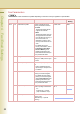
Fax Parameters
z The contents of Fax Parameter may differ depending on the each country’s regulation or specification.
No. Parameter Comments Selective Item Standard
Setting