
Operating Instructions - Function Parameters

38
Chapter 4 Fax/Email Settings
80-119
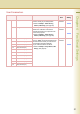
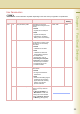
82 Quick Memory XMT Enable or disable the quick
memory transmission function.
•Invalid
Transmission starts after all
originals are scanned.
•Valid
Transmission starts when the
first page has been scanned
from the ADF into memory. If
there is more than one
destination, however, quick
memory transmission will not
work.
z For details about quick
memory transmission, refer to
Transmitting a Document
Stored in Memory in the
Operating Instructions (For
Facsimile and Internet Fax) on
the provided CD-ROM.
Invalid, Valid Valid
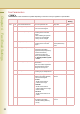
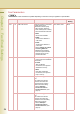
86 Ringer Volume Set the ringer volume.
Setting it to “Off” puts the ringer
on mute
Off, Soft, Medium,
Loud
Soft
89 List Output Tray Select an output tray for a printed
list.
z Outer is available when the
optional Paper Transport Unit
is installed.
Inner, Outer Inner
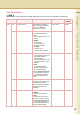
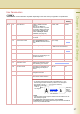
95 Duplex Print Enable or disable the duplex
printing of a received original.
z For details about the duplex
printing of a received original,
refer to Print Reduction in the
Operating Instructions (For
Facsimile and Internet Fax) on
the provided CD-ROM.
Invalid, Valid Invalid
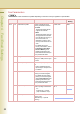
97 Special Tray Select the tray that will not be
used for printing received faxes.
Ex:
Exclude Tray 1 if colour
paper is loaded on Tray 1.
NO. 1, NO. 2, NO. 3,
NO. 4
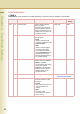
99 Memory Size Check the status of optional
memory card.
(Base Memory + Optional
Memory)
Fax Parameters
z The contents of Fax Parameter may differ depending on the each country’s regulation or specification.
No. Parameter Comments Selective Item Standard
Setting