
Operating Instructions - Function Parameters

37
Chapter 4 Fax/Email Settings
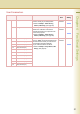
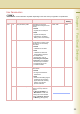
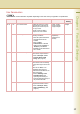
40-79 46 Select Receive Enable or disable selective
reception.
When set to “Valid”, the
machine will receive only when
the sender’s address has been
programmed in address book.
z Refer to Example : Select
Receive. (See page 54)
Invalid, Valid Invalid
48 Telephone Line Selecting the type of line
connected.
PSTN, PBX PBX
49 PSTN Access Code When “48 Telephone Line” is
set to “PSTN”, set PSTN Access
Code.
Up to 4-digit
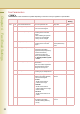
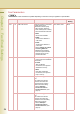
52 Diagnostic Password Set the diagnostic password. z Consult with the authorized Panasonic
dealer on how to use this item.
53 Sub-Address Password Set the sub-address password. Up to 20 characters
54 Fax Forward Set whether the machine
performs Fax Forwarding to the
specified destination.
Invalid, Valid Invalid
56 Cover Sheet (HOME) Set the default cover sheet. Off, On Off
57 Destination Code Selecting the destination code
when installing your machine.
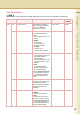
68 Dial Tone Check Set whether to detect dial tone
before dialling the telephone
number.
Off, On On
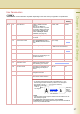
77 Department Code Enable or disable the department
management function.
Invalid, Valid Invalid
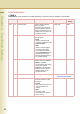
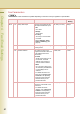
78 Rotation XMT Enable or disable the
transmission rotation function.
Invalid, Valid Valid
• Invalid
An A4/Letter sized portrait original is transmitted as it is. The
received original will be reduced or printed on A3 sized paper.
The original is set as ( ), the image is rotated by
90 and then transmited as ( ).
•Valid
A4/Letter sized portrait original is rotated and transmitted as an A4-
size landscape original.
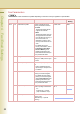
z For details about rotational transmission, refer to Rotated
Transmission in the Operating Instructions (For Facsimile and Internet
Fax) on the provided CD-ROM.
Fax Parameters
z The contents of Fax Parameter may differ depending on the each country’s regulation or specification.
No. Parameter Comments Selective Item Standard
Setting
Letter or
A4 Original
Sends with
70% Reduction
Receiving
Station
Letter or
A4 Paper