
Operating Instructions - Function Parameters

30
Chapter 4 Fax/Email Settings
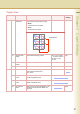
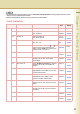
10-19 15 LDAP Server Name When “29 DNS Server Address” in General
Settings is set to “Yes”, set the LDAP Server
Name.
z Refer to Example : LDAP Server. (See
page 46)
Up to 60
characters
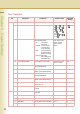
16 LDAP Server IP When “29 DNS Server Address” in General
Settings is set to “No”, set the LDAP Server
IP Address.
z Refer to Example : LDAP Server. (See
page 46)
3 digits x 4
17 LDAP User Name Set the LDAP User Name.
z Refer to Example : LDAP Server. (See
page 46)
Up to 40
characters
18 LDAP Password Set the LDAP Password.
z Refer to Example : LDAP Server. (See
page 46)
Up to 10
characters
19 LDAP Search Base Set the LDAP database to search.
z Refer to Example : LDAP Server. (See
page 46)
Up to 60
characters
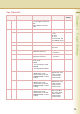
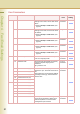
20-29 21 Default Subject Set the information added to the Subject
Line for all outgoing Emails.
Up to 40
characters
22 Default Domain Set the Domain Name added to frequently
used or incomplete outgoing Email
Addresses.
(Ex:) panasonic.com
Up to 50
characters
25 Selectable Domain (01) Set Domain Names to display on the
domain list. Up to 10 domain names can be
set.
After entering the part of the Email Address
preceding at mark “@”, select the desired
domain name.
Up to 30
characters
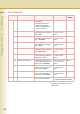
26 Selectable Domain (02)
27 Selectable Domain (03)
28 Selectable Domain (04)
29 Selectable Domain (05)
30-39 30 Selectable Domain (06)
31 Selectable Domain (07)
32 Selectable Domain (08)
33 Selectable Domain (09)
34 Selectable Domain (10)
35 Remote Password Set the password for the remote registration
of the internet parameters, address book
and the acquisition of a communication
management report via Email.
Up to 10
characters
User Parameters
No. Parameter Comments Selective
Item
Standard
Setting