
Operating Instructions - Function Parameters


24
Chapter 3 Copier Settings
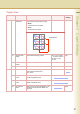
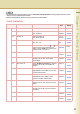
30-39 31 Mono Colour Judge Level Set the auto detection level for
colour original.
1: Making original easier to
detect as monochrome.
7: Making an original easier to
detect as coloured.
1 to 7 4
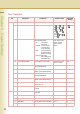
32 Colour Toner Save (T) In colour mode, set the level of
toner saving when the Original
Type is “Text”.
None, Level 1, Level
2, Level 3, Level 4,
Level 5
None
33 Colour Toner Save (T/P) In colour mode, set the level of
toner saving when the Original
Type is “Text/Photo”.
None, Level 1, Level
2, Level 3, Level 4,
Level 5
None
34 Colour Toner Save (P) In colour mode, set the level of
toner saving when the Original
Type is “Photo”.
None, Level 1, Level
2, Level 3, Level 4,
Level 5
None
35 Colour Toner Save (Other) In colour mode, set the level of
toner saving when the Original
Type is “Other Types”.
None, Level 1, Level
2, Level 3, Level 4,
Level 5
None
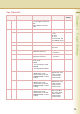
36 Mono Toner Save (T) In monochrome mode, set the
level of toner saving when the
Original Type is “Text”.
None, Level 1, Level
2, Level 3, Level 4,
Level 5
None
37 Mono Toner Save (T/P) In monochrome mode, set the
level of toner saving when the
Original Type is “Text/Photo”.
None, Level 1, Level
2, Level 3, Level 4,
Level 5
None
38 Mono Toner Save (P) In monochrome mode, set the
level of toner saving when the
Original Type is “Photo”.
None, Level 1, Level
2, Level 3, Level 4,
Level 5
None
39 Mono Toner Save (Other) In monochrome mode, set the
level of toner saving when the
Original Type is “Other Types”.
None, Level 1, Level
2, Level 3, Level 4,
Level 5
None
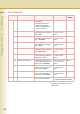
40-44 40 Copy Customize Set whether to indicate the More
Menus functions individually.
No. 32 to 39
As the level value is greater, the more
toner is saved.
Key Operator
No. Parameter Comments Selective Item Standard
Setting