
Operating Instructions - Function Parameters


23
Chapter 3 Copier Settings
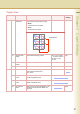
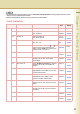
10-19 15 Colour Balance Set the default colour balance
for Cyan, Magenta, Yellow and
Black.
(Darker, Medium and Lighter
Areas)
-3 to +3 0
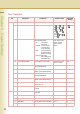
20-29 21 Page Insertion Default Set the default page insertion. Blank, Copy Blank
22 Cover Mode Default Set the default Cover Mode. F, Blank,
F, Copy,
FB, Blank,
FB, Copy
(F: Front cover, FB:
Front & Back cover)
F, Blank
23 Job Build and SADF Mode Enable or disable SADF Mode. No, Yes Yes
24 Maximum Copy Setting Set the limit copy count. 0 to 99
(0: No limit)
0
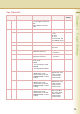
25 M1, Size Change the skyshot size
registered on the M1 key.
X: 5 to 432mm
Y: 5 to 297mm
70,160
26 M2, Size Change the skyshot size
registered on the M2 key.
X: 5 to 432mm
Y: 5 to 297mm
95, 220
27 Memory Overflow Warning Set sort copying when the
memory is full.
•Print
The read original is copied.
•Cancel
The read original is deleted.
Print, Cancel Print
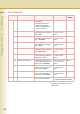
28 Colour Spec (1Colour) Set the default one colour.
z “Preset 1 to 6” can be
selected when you set “20
Add User Colour” in Copier
Settings.
Red, Yellow, Green,
Magenta, Blue, Cyan,
Preset1, Preset2,
Preset3, Preset4,
Preset5, Preset6
Red
29 Colour Spec (2Colour) Set the default two colours.
z “Preset 1 to 6” can be
selected when you set “20
Add User Colour” in Copier
Settings.
Red, Yellow, Green,
Magenta, Blue, Cyan,
Preset1, Preset2,
Preset3, Preset4,
Preset5, Preset6
Red
30-39 30 Colour Spec (Overlay) Set the default overlay colour.
z “Preset 1 to 6” can be
selected when you set “20
Add User Colour” in Copier
Settings.
Full, Red, Magenta,
Green, Cyan, Blue,
Black, Yellow, White
Preset1, Preset2,
Preset3, Preset4,
Preset5, Preset6
Full
Key Operator
No. Parameter Comments Selective Item Standard
Setting