
Operating Instructions - Function Parameters


22
Chapter 3 Copier Settings
Key Operator
No. Parameter Comments Selective Item Standard
Setting
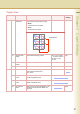
0-9 00 Print Copier Settings Print a Copier Settings list. Stop, Start Start
01 Paper Size Priority Set the paper size priority.
A3 , B4 , A4 ,
A4 , B5 , B5 ,
A5 , 11x17 ,
Legal , 8.5x11 ,
8.5x11 ,
5.5x8.5 , 8x13 ,
8.5x13
A4
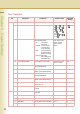
02 Original Mode Default Set the default Original Type of
the quality adjustment.
• Text : Text1 (Printed),
Text2 (Pencil)
• Text/Photo : T/P1 (Commercial),
T/P2 (Photo Paper),
T/P3 (Laser Printed)
• Photo : Photo1 (Commercial),
Photo2 (Photo Paper),
Photo3 (Laser Printed)
• Other Types: Other1 (Map),
Other2 (Tracing Paper),
Other3 (News Paper)
Text1, Text2, T/P1,
T/P2, T/P3, Photo1,
Photo2, Photo3,
Other1, Other2,
Other3
T/P1
03 Colour Mode Default Set the default Colour Mode. Auto, Black, Colour,
2Colour, 1Colour
Auto
04 Text Density When Original Mode is “Text”,
set the default density.
-3 to +3 0
05 T/P Density When Original Mode is “Text/
Photo”, set the default density.
-3 to +3 0
06 Photo Density When Original Mode is “Photo”,
set the default density.
-3 to +3 0
07 Density (Other Type) When Original Mode is “Other
Types”, set the default density.
-3 to +3 0
08 Overlay Density Set the default density for
overlay copying.
-3 to +3 0
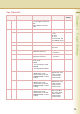
09 Background Removal Set the default Background
Removal.
Off, Level:1 to Level:6 Level:3
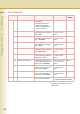
10-19 10 Bleed-Through Prevention Set the default bleed-through
prevention.
Off, Level:1 to Level:6 Off
11 Contrast Set the default contrast. -3 to +3 0
12 Sharpness Set the default sharpness. -3 to +3 0
13 Saturation Set the default colour saturation. -3 to +3 0
14 Tint Set the default tint. -3 to +3 0