
Operating Instructions - Function Parameters


16
Chapter 2 General Settings
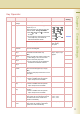
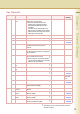
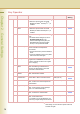
60-79 64 Rendezvous Set the Rendezvous.
z When the optional Printer Controller
Module (for Adobe
®
PostScript
®
3
™
)is
installed.
Off, On Off
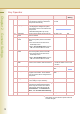
65 Rendezvous
Name
Set the name of Rendezvous.
z When the optional Printer Controller
Module (for Adobe
®
PostScript
®
3
™
)is
installed.
Up to 31 characters
66 IPv6 Set “On” when using the machine for
IPv6.
z For details about setting IPv6, refer to
Embedded Web Server in the
Document Management System (For
Embedded Web Launcher and Web
Server) on the provided CD-ROM.
Off, On Off
70 Auto Tone Adjust If the coloured image tone has deviated,
set the automatic tone adjustment.
<Procedure>
1. Execute this mode to print the calibration
sheet.
2. Place the calibration sheet on the platen
and execute this mode again.
Stop, Start Stop
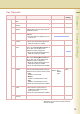
71 Tone Adjust Reset If “70 Auto Tone Adjust” has made the
original tone unidentifiable, execute this
mode to reset the machine to the original
tone at shipping.
Stop, Start Stop
73 Administrator
Name
When “75 User Authentication” is set to
“On” and selecting Local Machine as
domain, set administrator’s name and
password for authentication.
Up to 40 characters
74 Authentication
Method
When “75 User Authentication” is set to
“On”, authentication method.
NTLM, Clr Text NTLM
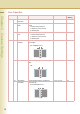
75 User
Authentication
Set the User Authentication, and then
select “Off” or “On” for selected function.
Copy, Fax, Print,
Scan (Off, On)
76 ID Timeout When “75 User Authentication” is set to
“On”, set when the machine requires the
authentication.
Auto Rst, EveryJob Auto Rst
77 Log-on Attempts When “75 User Authentication” is set to
“On”, set the number of logon attempts.
(Set “0” for unlimited attempts.)
0 to 9 0
78
User Auth. Domain
When “75 User Authentication” is set to
“On”, set domain for authentication.
No.00 to 09
79 Lockout Time When “75 User Authentication” is set to
“On”, set the lockout time.
If you failed to log on specified times, you
cannot log on again during the lockout time.
1 to 60 (min.) 5 (min.)
No.61 to 66
After setting, turn the machine’s power switch Off,
and then On again.
Key Operator
No. Parameter Comments Selective Item Standard
Setting