
Operating Instructions - Function Parameters

12
Chapter 2 General Settings
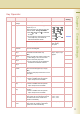
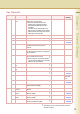
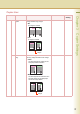
0-19 15 Sleep Timer If you do not select any key within a given
time period, the machine is switched to
sleep mode automatically.
None,
1 to 240
22
17 Language Default Set the display language.
If the language is changed, the system
automatically returns to the initial function
setup screen.
z Standard Setting differs by country.
18 Panel Beep
Sound
Set the volume of Beep Sound when the
panel is selected.
Off, Soft, Loud Soft
19 Original Set Beep
Sound
Set whether to sound a confirmation tone
when the original is placed on the Platen
Glass.
z The volume level is the same as for
Panel Beep Sound.
z When “18 Panel Beep Sound” is set to
“Off”, the machine makes no sound.
No, Yes No
20-39 20 Orig. Set In ADF
Sound
Set whether to sound a confirmation tone
when the original is placed on the ADF.
z The volume level is the same as for
Panel Beep Sound.
z When “18 Panel Beep Sound” is set to
“Off”, the machine makes no sound.
No, Yes Yes
21 Dept. Counter
Mode
Set whether to display departmental
counters, limit counters, and total counters.
z Consult with the authorized
Panasonic dealer on how to use
this item.
22 Date Time Setting Set the date and the time. Month, Day, Year,
Time
23 Weekly Timer Set the weekly On/Off timer using the
Keypad of the machine. At the selected
time, the machine will be changed to/from
sleep mode.
Each day of the
week.
Off
24 Daylight Time Set Daylight Time.
z This setting is only for Germany.
No, Yes Yes
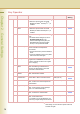
25 DHCP Default Select “Yes” when your network
environment is based on DHCP Server.
When using this machine as a network
shared printer, select “No” and set “26
TCP/IP Address”, “27 TCP/IP Subnet
Mask”, and “28 TCP/IP Default Gateway”.
No, Yes Yes
26 TCP/IP Address Set the IP address. 3-digit x 4 0. 0. 0. 0
No. 25 and 26
After setting, turn the machine’s power switch Off,
and then On again.
Key Operator
No. Parameter Comments Selective Item Standard
Setting