
Printer/Fax/Scanner/Copier Operating Instructions

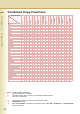
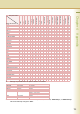

Table Of Contents
- Operating Instructions
- Conventions
- Table of Contents
- Basic Menu Features
- Basic Operation Procedure
- Selecting the Color Mode
- Selecting Original Type and Adjusting the Density
- Registering Quality Preset
- Using Quality Preset
- Quality Adjusting
- Proof Copying
- Confirming/Editing the Selected Copy Features
- Storing a Job in Memory
- Recalling a Preset Job Stored in Memory
- Checking the Waiting to Copy Job
- Completion Notice
- More Menus Features
- 2-Sided Copy Mode
- Basic Operation for the 2-Sided Copy Mode
- Copying 2-Sided Original(s) onto Two Separate Sheets
- Copying Facing Page Original to Two Separate Sheets
- From 1-Sided Originals to 2-Sided Copies Using Saddle Stitch (Booklet)
- Copying Mixed Size Originals from the ADF
- Copying Special Originals (Thin Paper, etc.) from the ADF
- Sort Mode
- Zoom Mode
- Effect Modes
- Insertion Modes
- Overlay Modes
- 2-Sided Copy Mode
- Other Features
- Appendix

94
Chapter 4 Appendix
Chapter 4
Appendix
Combined Copy Functions
1 -> 2
2 -> 1
2 -> 2
2 Page
Book -> 2
N in 1
Booklet
Multi-Size Feed
Job Build & SADF
Sort
Non Sort
Shift-Sort
Shift-Group
Rotate-Sort
Rotate-Group
Staple-Sort
Punch
Zoom
Auto Zoom
1 -> 2 / AAAAAAx
2 -> 1 A / AAAAAx x
2 -> 2 AA / AAAAx x
2 Page AAA / AAAx x
Book -> 2 AAAA / AAx x
N in 1 AAAAA / Ax x
Booklet AAAAAA/ x xxxxxxxx x
Multi-Size Feed xxxxxxx /x *1*1 x
Job Build and SADF x/ x
Sort A / AAAAAA
Non Sort A A / AAAAA
Shift-Sort *1 A AA / AAAAA
Shift-Group *1 A AAA / AAAA
Rotate-Sort A*1 AAAA / AAx A
Rotate-Group A*1 AAAAA / Ax x
Staple-Sort *1 *2 AAAAAA /
Punch *1 Axx/
Zoom /A
Auto Zoom xxAAAxAx xx A/
Edge x
Book xx x
Margin x x
Mirror
Stamping xx *3 *3 *3 x
Centering xxAAAxAx xx
Image Repeat AxxAAAxAx xx x
Inverse
Cover xxxxxx x xxx x
Page Insertion xxxxxx x xxx x
Transparency Interleaving x xxxxxxxx xxxxxx x
Overlay xxxxx xx
Form Overlay xxxxx xx
Digital Skyshot xx xxx x
Manual Skyshot xxxxxxxxxxxxxxxxx x
Completion Notice
Interrupt
Proof Copy
Double Exposure xxxxxxxxx x x
Newly Set Functions
Initially Set Functions
Blank: Combined setting is available.
x: Combined setting is not available.
A: The latter selection has the priority over the initially selected function.
/: There is no combination.
*1: The setting is possible only when the paper size is the same.
*2: “Saddle Stitch” is set.
*3: When “Issue Number” is selected in the Stamp function, “Non Sort”, “Shift-Group”, or “Rotate-Group”
cannot be selected.