
Printer/Fax/Scanner/Copier Operating Instructions

Table Of Contents
- Operating Instructions
- Conventions
- Table of Contents
- Basic Menu Features
- Basic Operation Procedure
- Selecting the Color Mode
- Selecting Original Type and Adjusting the Density
- Registering Quality Preset
- Using Quality Preset
- Quality Adjusting
- Proof Copying
- Confirming/Editing the Selected Copy Features
- Storing a Job in Memory
- Recalling a Preset Job Stored in Memory
- Checking the Waiting to Copy Job
- Completion Notice
- More Menus Features
- 2-Sided Copy Mode
- Basic Operation for the 2-Sided Copy Mode
- Copying 2-Sided Original(s) onto Two Separate Sheets
- Copying Facing Page Original to Two Separate Sheets
- From 1-Sided Originals to 2-Sided Copies Using Saddle Stitch (Booklet)
- Copying Mixed Size Originals from the ADF
- Copying Special Originals (Thin Paper, etc.) from the ADF
- Sort Mode
- Zoom Mode
- Effect Modes
- Insertion Modes
- Overlay Modes
- 2-Sided Copy Mode
- Other Features
- Appendix
73
Chapter 2 More Menus Features
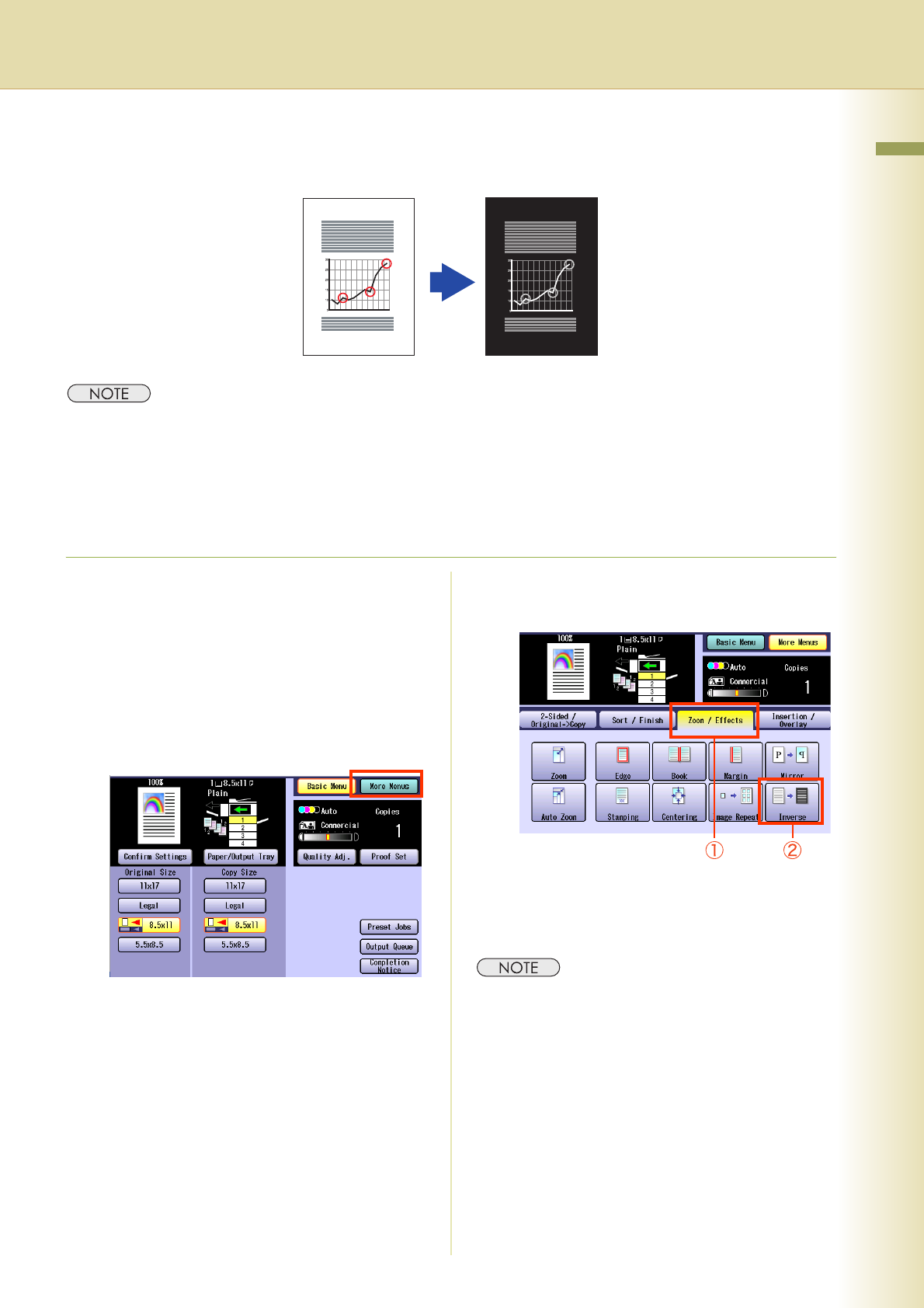
Copying Inverse Image
The tonal inversion of image can be copied in black and white.
z This function is only available when “Black” is selected in the Color mode. If the “Inverse” is selected when the
other Color mode has been set, a message appears prompting you to change the setting to “Black”.
z This function is canceled if the Color mode is changed from “Black” to the other Color mode after selecting
“Inverse”.
z The Color mode remains set to “Black” even if the Inverse mode is canceled. To cancel the “Black” mode,
select other Color mode or press the Reset key.
1
Place original(s).
z Refer to Placing Originals (Copy) in the
Operating Instructions (For Basic
Operations) of provided booklet.
2
Press the Copy key if the machine is
set to other function mode.
3
Select “More Menus”.
4
Select “Zoom / Effects”, and then
select “Inverse”.
5
Enter the desired number of copies.
6
Press the Start key.
z After finishing copying, press the Reset key to
return to the initial screen of the currently active
mode.