
Digital Color Imaging Systems Operating Instructions Model No. DP-C354 / C264, Model No. DP-C323 / C263 / C213



90
Chapter 4 Fax Reception
Receive to Memory
What is Memory Reception?
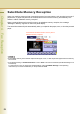
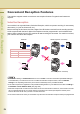
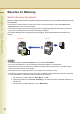
Memory reception allows all incoming documents to be stored in memory, instead of printing them onto
the output tray.
z If the memory reception feature has been set to “On” in Function Parameters, the message Receive to
Memory appears on the touch-panel display.
z Documents received in memory are printed when the pre-programmed password is entered. The received
documents are deleted from memory when their printing completes.
This section explains how to program memory reception, and print documents received into the
memory.
z The standard setting of “Receive to Memory” is set to “Off” in “More Menus”.
z You can set the password in Function Parameters (Fax/Email Settings> Fax Parameters).
z When memory becomes full, the memory reception is aborted and the communication is canceled. Pages
already received in memory can be printed.
z Once memory is full, incoming documents can no longer be received into memory.
z If the memory reception feature has been set to “On”, the memory reception password cannot be changed in
Function Parameters. To change the password, follow the steps below:
1. Set the memory reception feature in “More Menus” to “Off”.
2. Change the password of “37 Receive to Memory” in Function Parameters (Fax/Email Settings> Fax
Parameters).
3. Set the memory reception feature to “On” in “More Menus”.
Receiver Sender
Memory