
Digital Color Imaging Systems Operating Instructions Model No. DP-C354 / C264, Model No. DP-C323 / C263 / C213


69
Chapter 3 Convenient Fax Features
Sub-Addressed Transmission using Address Book
To transmit a document by sub-addressing, follow the steps below:
z This feature cannot be used when dialing from the external telephone. Refer to Talking to the Remote Party
Before Transmission (see page 25).
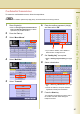
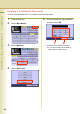
1
Place Original(s).
z Refer to
Placing Originals (Facsimile/Internet
Fax) in the Operating Instructions
(For Basic
Operations) of provided booklet.
2
Press the Fax key.
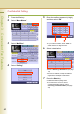
3
Select “More Menus”.
4
Select “Sub Address Transmit”.
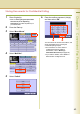
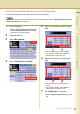
5
Enter a sub-address, and then select
“OK”.
z The sub-address can be up to 20 digits.
z If you make a mistake, select “Clear” to
delete entries one digit at a time.
6
Enter the password, and then select
“OK”.
z The password can be up to 20 digits in
length.
z If you make a mistake, select “Clear” to
delete entries one digit at a time.
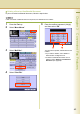
7
Set “Quality Adj.” as required.
z Refer to Setting Original Quality (see page
26).
Continue on the next page...