
Digital Color Imaging Systems Operating Instructions Model No. DP-C354 / C264, Model No. DP-C323 / C263 / C213


65
Chapter 3 Convenient Fax Features
Printing a Received Confidential Document
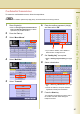
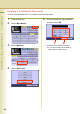
To print a received confidential document, follow the steps below:
z After a received confidential document is printed, it is deleted from the mailbox.
1
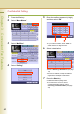
Press the Fax key.
2
Select “More Menus”.
3
Select “Mail Box”.
4
Select “Print File”.
5
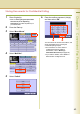
Enter the mailbox password (4-digit),
and then select “OK”.
The document is printed, and deleted from the
mailbox.
z If you make a mistake, select “Clear” to
delete entries one digit at a time.
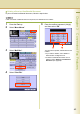
z To delete confidential documents from a
mailbox, refer to Deleting a Confidential
Document (see page 66).