
Digital Color Imaging Systems Operating Instructions Model No. DP-C354 / C264, Model No. DP-C323 / C263 / C213



216
Chapter 10 Appendix
Chapter 10
Appendix
Replacing the Verification Stamp
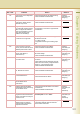
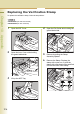
To replace the verification stamp, follow the steps below:
z DZHT000027 (for USA and Canada)
z DZHT000004 (for other countries)
1
Open the ADF Cover.
2
Open the Inner Cover while holding
the green-labeled tab.
3
Lift up the ADF Tray.
4
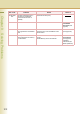
Open the Exit Guide while holding the
green-labeled tab.
5
Remove by pulling the Stamp
Assembly upward.
6
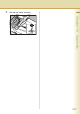
Remove the Stamp. Replace the
stamp with a new one, or refill the
stamp with a few drops of the specified
ink onto the back of the stamp.
P9250577