
Digital Color Imaging Systems Operating Instructions Model No. DP-C354 / C264, Model No. DP-C323 / C263 / C213


174
Chapter 7 Program Destinations / Program Keys
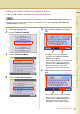
Deleting a Destination from Address Book
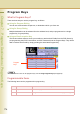
To delete a remote station from the address book, follow the steps below:
1
Press the Function key.
2
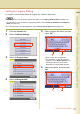
Select “Fax/Email Settings”.
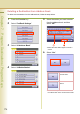
3
Select “00 Address Book”.
4
Select “04 Delete Station”.
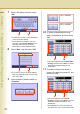
5
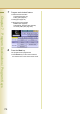
Select the station you want to delete
from the address book, and then
select “OK”.
z Select the same button again to cancel a
choice.
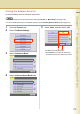
6
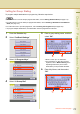
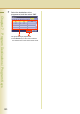
Select “Yes”.
z Press Reset key to return the machine to
the initial screen of the current active mode.
Select to delete the
selected station.
Select to cancel the
deletion.