
Digital Color Imaging Systems Operating Instructions Model No. DP-C354 / C264, Model No. DP-C323 / C263 / C213


167
Chapter 6 Handling Communication Reservation Files
Resending an Incomplete Document
With “31 Incomplete File Save” set to “Valid” in Function Parameters (Fax/Email Settings> Fax
Parameters), documents that could not be transmitted due to a communication error (such as the
remote station busy or not responding) can be stored in memory as incomplete files.
This section explains how to resend incomplete files stored in memory.
z The standard setting of “31 Incomplete File Save” is set to “Invalid”. For instructions on how to modify the
standard setting, refer to Fax/Email Settings in the Operating Instructions (For Function Parameters) on the
provided CD-ROM.
z If “31 Incomplete File Save” is set to “Valid” in Function Parameters (Fax/Email Settings> Fax Parameters), all
incomplete files remain in the memory each time a communication error occurs. To avoid memory overflow,
retry to send the incomplete file from time to time.
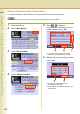
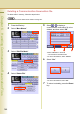
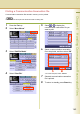
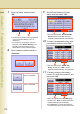
1
Press the Fax key.
2
Select “More Menus”.
3
Select “Edit File Mode”.
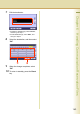
4
Select “Retry Incomp. File”.
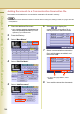
5
Select or to find the incomplete
file that you want to resend.
z To send all incomplete files, select “Select
All”.
6
Select the incomplete file that you
want to resend, and then select “OK”.
The communication error file is resent.
z To cancel the resend, select “Cancel”.