
Digital Color Imaging Systems Operating Instructions Model No. DP-C354 / C264, Model No. DP-C323 / C263 / C213


164
Chapter 6 Handling Communication Reservation Files
Deleting a Communication Reservation File
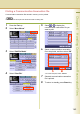
To delete a file in memory, follow the steps below.
z Your machine cannot delete the file while it is being sent.
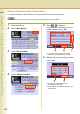
1
Press the Fax key.
2
Select “More Menus”.
3
Select “Edit File Mode”.
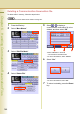
4
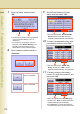
Select “Delete File”.
5
Select or to display a
communication reservation file to be
deleted, and then select “OK”.
z Select “All Files” to select all
communication reservation files.
z To cancel the deletion, select “Cancel”.
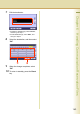
6
Select “Yes”.
z To cancel the deletion, Select “No”.
7
To return to standby, press the Reset
key.