
Digital Color Imaging Systems Operating Instructions Model No. DP-C354 / C264, Model No. DP-C323 / C263 / C213

148
Chapter 5 Internet Fax
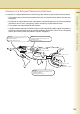
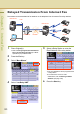
Adding End Receiving Stations for Relayed Transmission
You can add end receiving stations to the Address Book by the following procedure.
z If broadcasting to multiple end receiving stations is required, use group dialing. (See page 179)
z “140 LAN RLY XMT Request” must have been set to “Valid” in Function Parameters (Fax/Email Settings> Fax
Parameters) to have a LAN relayed transmission request pre-programmed in the address book. For more
operational details, refer to Fax/Email Settings in the Operating Instructions (For Function Parameters) on the
provided CD-ROM.
z For instructions on registration in the address book, refer to Address Book (see page 168).
z You cannot use the address registered for Relayed Transmission for Confidential Communication, Sub-
Address Communication, and Password Transmission. Register an address without a relayed station. (See
page 169)
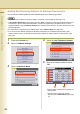
1
Press the Function key.
2
Select “Fax/Email Settings”.
3
Select “00 Address Book”.
4
Select “01 Add Telephone Number”.
5
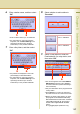
Enter a fax number, and then select
“OK”.
z Select “Clear” to delete the fax number one
digit at a time.
z
For instructions on using the onscreen
keyboard, refer to
Manual Dialing (see page
16)
.