
Digital Color Imaging Systems Operating Instructions Model No. DP-C354 / C264, Model No. DP-C323 / C263 / C213

138
Chapter 5 Internet Fax
7
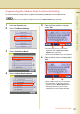
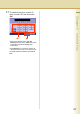
Enter a Key Name, and then select
“OK”.
z Key Names are used to select the
destinations on the touch-panel display.
z For instructions on using the onscreen
keyboard, refer to Before Starting in the
Operating Instructions (For Function
Parameters) on the provided CD-ROM.
8
Select “IFax”, and then select “OK”.
z If you wish to use it in the Email Address
Book of Scan/Email mode and Fax mode
both, select “PC”.
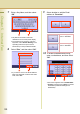
9
Select whether to add the Email
address to “Favorites”.
10
To enable sub-addressed routing,
enter a sub-address, and then select
“OK”.
z This screen appears when “152 Sub-Addr
Routing” has been set to “Valid” in Function
Parameters (Fax/Email Settings>Fax
Parameters).
Select to display the
station in “Favorites”.
Select not to display the
station in “Favorites”.