
Digital Color Imaging Systems Operating Instructions Model No. DP-C354 / C264, Model No. DP-C323 / C263 / C213



127
Chapter 5 Internet Fax
Using a Completion Notice
The Completion Notice feature notifies your computer when the sending Email, or Fax Transmission is
completed.
z Before using this function, install the Panasonic Document Management System and PCL Printer Driver, and
then set up each software.
z Refer to Completion Notice in the Operating Instructions (For Setting Up) of provided booklet.
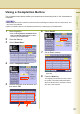
1
Place Original(s).
z
Refer to
Placing Originals (Facsimile/Internet
Fax) in the Operating Instructions
(For Basic
Operations) of provided booklet.
2
Press the Fax key.
3
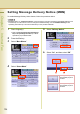
Select “Basic Menu”.
4
Select “Completion Notice”.
5
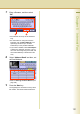
Select a computer to be informed, and
then select “OK”.
6
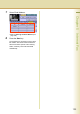
Select “Email”
7
Set an Email Address.
z
Refer to
Entering an Email Address (see
page 108)
.
8
Press the Start key.
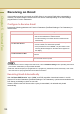
The original(s) are stored into memory with a
file number. Then starts email transmission.
When the Email is sent, completion notice is
also sent to the computer.