
Digital Color Imaging Systems Operating Instructions Model No. DP-C354 / C264, Model No. DP-C323 / C263 / C213



121
Chapter 5 Internet Fax
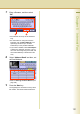
7
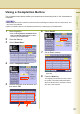
Enter a filename, and then select
“OK”.
z The filename can be up to 20 characters
long.
z For instructions on using the onscreen
keyboard, refer to Before Starting in the
Operating Instructions (For Function
Parameters) on the provided CD-ROM.
z If you make a mistake, select “Back Space”
to delete one character at a time, or move
the cursor to the beginning of the field, and
then select Clear key to delete the entire
entry.
8
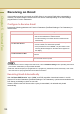
Select “Address Book” and then, set
an Email Address.
z Refer to Entering an Email Address (see
page 108).
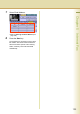
9
Press the Start key.
The original(s) are stored into memory with a
file number. Then starts email transmission.