
Digital Color Imaging Systems Operating Instructions Model No. DP-C354 / C264, Model No. DP-C323 / C263 / C213



119
Chapter 5 Internet Fax
Setting Subject
Every time you send an Email, you can enter its
subject manually. To enter a subject, follow the
steps below:
z The Default Subject is preset if “21 Default
Subject” has been set in Function Parameters
(Fax/Email Settings> User Parameters). For
programming instructions, refer to Fax/Email
Settings in the Operating Instructions (For
Function Parameters) on the provided CD-ROM.
1
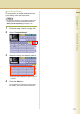
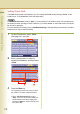
On the Email screen, select “Subject”.
(See pages 107, and 116)
2
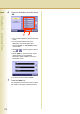
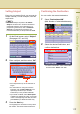
Enter a subject, and then select “OK”.
z The subject field is up to 40 characters in
length.
z For instructions on using the onscreen
keyboard, refer to Before Starting in the
Operating Instructions (For Function
Parameters) on the provided CD-ROM.
z
If you make a mistake, select “
Back Space
”
to delete one character at a time, or move the
cursor to the beginning of the field, and then
press
Clear
key to delete the entire entry.
3
Press the Start key.
The original(s) are stored into memory with a
file number. Then starts email transmission.
Confirming the Destination
You can confirm the entered destinations.
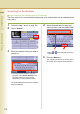
1
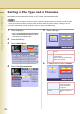
Select “Destinations:###”.
(###: Number of selected addresses)
2
Select the desired field button, and
confirm destinations.
z To delete a destination, select a destination,
and then select “Delete” and “Yes”.