
Digital Color Imaging Systems Operating Instructions Model No. DP-C354 / C264, Model No. DP-C323 / C263 / C213



114
Chapter 5 Internet Fax
6
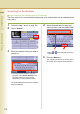
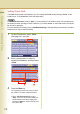
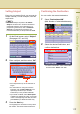
Choose a destination, and then select
“OK”.
z Only one Email Address can be selected at
a time.
z You can switch between the Email
Addresses, and Fax Numbers list by
selecting “Email” or “Fax Number” button
on the screen.
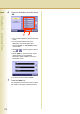
z Select or to scroll through the search
results.
z Select “Detail” to open the screen shown
below offering you more detailed
information. Select “Close” to exit to the
information screen.
z To cancel a search, select “Cancel”.
7
Press the Start key.
The original(s) are stored into memory with a
file number. Then starts email transmission.