
- Digital Color Imaging Systems Operating Instructions






87
Replacing
Consumables
Continued on the next page...
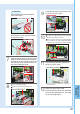
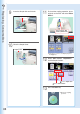
Pull out the Stapler Unit.
3
Stapler Unit
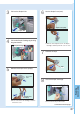
Set the Staple Case (new).
6
Pull out the Staple Cartridge by pinching
the green buttons.
4
Remove the tape.
7
Remove the Staple Case (empty).
5
Insert the Staple Cartridge.
8
● Press each side of the Cartridge, and then
remove the cover.
● Insert it all the way in until it locks.
Staple Cartridge
Staple Case
(empty)
Press both
sides.
Staple Cartridge
Tape
Staple Case (new)
● Slide the new Staple Case into the Staple
Cartridge, and then push the cover to close.