
- Digital Color Imaging Systems Operating Instructions

79
Replacing
Consumables
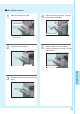
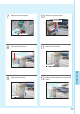
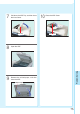
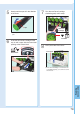
Turn the new Toner Cartridge
clockwise gently until it stops.
7
Firmly close the Front Cover.
8
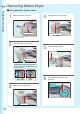
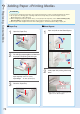
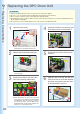
Insert the new Toner Cartridge all the
way in until it stops with the arrow label
pointing to the Unlock Mark.
6
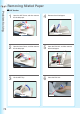
New Toner
Cartridge
Front Cover
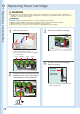
Gently peel the tape off in the direction
of the arrow.
5
Tape
Unlock Mark
Lock Mark
● Do not open the Shutter, otherwise toner will
spill.
● If the Toner Cartridge is not turned to the
Lock Mark properly, you cannot close the
Front Cover.
New Toner Cartridge