
- Digital Color Imaging Systems Operating Instructions




29
Copying
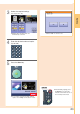
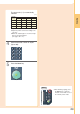
Enter the desired number of copies.
(Up to 999)
4
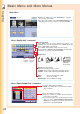
Press the Start key.
5
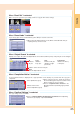
● After finishing copying, press
the Reset key to return the
machine to the initial screen of
the currently active mode.
NOTE
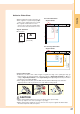
11" x 17"
Legal
8.5" x 11"
5.5" x 8.5"
11" x 17"
100 77 65 50
Legal 121 100 79 61
8.5" x 11"
129 100 100 65
5.5" x 8.5"
200 155 129 100
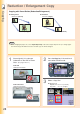
The exact ratio (%) is automatically
selected.
Copy Size (Landscape)
● Paper Tray will be selected according to the
copy size.
● When the suitable paper is not in the Paper
Tray, use the Sheet Bypass.
(See pages 76 to 77)
(%)
(Legal : 8.5" x 14")
Original
Size
(Landscape)