
Digital Imaging Systems DP-8060 / 8045 / 8035 Operating Instructions

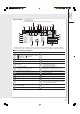
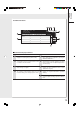
Table Of Contents
- Table of Contents
- Product Overview
- Copying
- Printing
- Network Scanning
- Facsimile / Internet Fax/Email
- Problem Solving
- Troubleshooting
- User (U) / Error Codes
- Removing Misfed Paper
- Locations/User Error Codes (J Codes)
- System Console (Option) (A)
- Paper Entry Area (B)
- Paper Transport Area (C)
- Paper Exit/Fuser Area (D)
- Automatic Duplex Unit (ADU) (E)
- Reverse Area (F)
- 3000-Sheet Tray (LCT) (Option) (G)
- 2-Bin Finisher (Option) (H) (DA-FS600/605)
- 2-Bin Finisher (Option) (H) (DA-FS330)
- 1-Bin Saddle-Stitch Finisher (Option) (H)
- 2-Bin Saddle-Stitch Finisher only (Option) (I)
- 1-Bin Saddle-Stitch Finisher (Option) (I/F)
- i-ADF (J)
- Replacing Consumables
- Appendix
- Specifications
- DP-8060/8045/8035 (Copier)
- i-ADF (Standard)
- Printer Unit
- System Console 1 (DA-DS603)
- System Console 2 (DA-DS604)
- For G3 Facsimile (Option) [DA-FG600]
- For Internet Fax (Email) [Standard]
- 3000-Sheet Tray (LCT) (DA-MA301)
- Letter-R/Legal Size Adaptor for 3000-Sheet Tray (LCT) (DA-TK31)
- 2-Bin Finisher (DA-FS600)
- 2-Bin Saddle-Stitch Finisher (DA-FS605)
- Punch Unit (DA-SP31) [for DA-FS600/605]
- 2-Bin Finisher (DA-FS330) (1/2)
- 2-Bin Finisher (DA-FS330) (2/2)
- 1-Bin Saddle-Stitch Finisher (DA-FS355A)
- Punch Unit (DA-SP41) [for DA-FS355A]
- Option and Supplies
- Multi-Tasking Job Table
- FCC Notice
- Index
- Glossary
- Specifications
19
Product
Overview
Contents
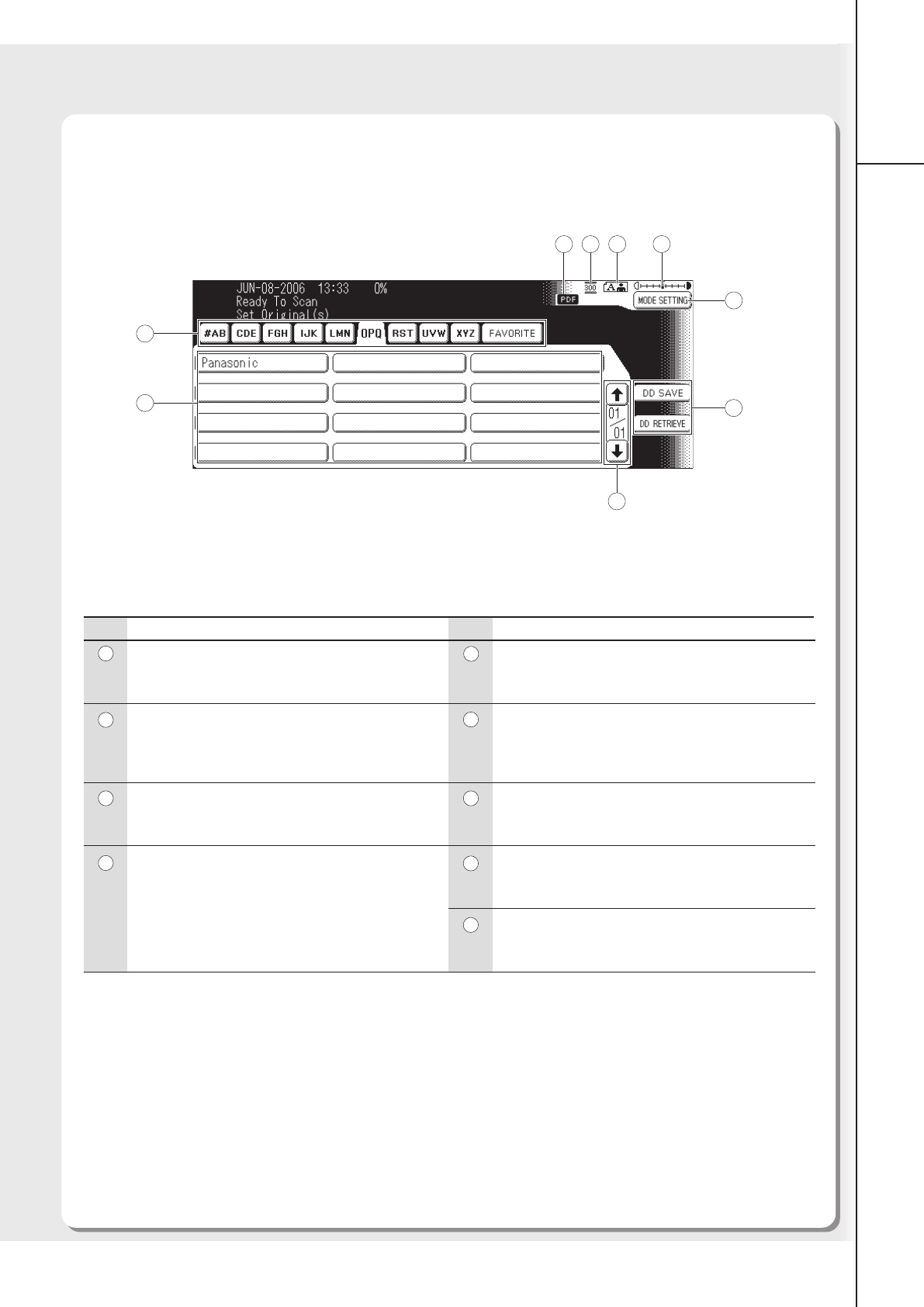
File Type
Displays the scanning file type (TIFF or PDF).
Resolution
Your machine is preset to 300dpi resolution, which
is suitable for most documents.
Original
Shows the type of original.
Contrast Indication
The scanning contrast densities which are set in
the Mode Setting screen are displayed in 7 levels.
Contents
MODE SETTING Button
More setting can be configured by pressing the
MODE SETTING Button.
DD SAVE/DD RETRIEVE Buttons
Optional DD Server Software (DA-WS20) is required.
For more details, refer to the Operating Instructions
(For DD Server).
Scroll Buttons
Displays the other destination screen of same
alphabetical tab group.
Destination Buttons
Displays the registered destinations (PC/Email
Address).
Address Tabs
Selects an alphabetical tab group from the Address
Book.
No. No.
Scan/File Functions
■■
■■
■
Touch Panel Display Indications
1
2
3
4
6
7
8
5
2 3
4
5
6
7
8
9
1
9