
Digital Colour Imaging Systems Operating Instructions


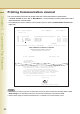
Table Of Contents
- Operating Instructions
- Conventions
- Table of Contents
- Getting To Know Your Machine
- Basic Fax Transmission
- Fax Transmission Procedure
- Entering a Destination
- Transmission with Destination Monitoring
- Talking to the Remote Party Before Transmission
- Setting Original Quality
- Setting the Original Size
- Transmitting 2-Sided Originals
- Verification Stamp
- Transmitting a Document Stored in Memory
- Job Build and SADF
- Direct Transmission
- Verifying Communication Status
- Rotated Transmission
- Batch Transmission
- Getting an Outside Line Using PIN Code Access
- Using Program Keys
- Cancelling a Communication
- Dial Prefix
- Convenient Fax Features
- Fax Reception
- Internet Fax
- What is Internet Fax?
- What Internet Fax Can Do
- Tips for Internet Fax
- Preparing to Use Internet Fax
- Sending an Email Procedure
- Entering an Email Address
- Using Cc, Bcc and From
- Setting a File Type and a File Name
- Emailing an A3-Sized Document
- Setting Message Delivery Notice (MDN)
- When Email Transmission Fails
- Using a Completion Notice
- Receiving an Email
- Receiving an Email on a Computer
- Inbound Routing
- Using the Relay Feature
- Relayed Transmission from Internet Fax
- Relayed Transmission from PC
- Result of Relayed Transmission
- Useful Terms to Remember
- Handling Communication Reservation Files
- Program Destinations/Program Keys
- Reading Reports/Lists
- Solving Problems
- Appendix
80
Chapter 3 Convenient Fax Features
Printing Communication Journal
The communication journal can be printed at the end of each transmission communication.
• If “Comm. Journal” is set to “On” in “More Menus”, a communication journal is printed at the end of
each transmission communication.
• For instructions on how to read the communication journal, refer to Communication Journal (see
page 196).
z Your machine is preset to print the communication journal only when transmission has failed. Refer to Fax/
Email Settings in the Operating Instructions (For Function Parameters) of provided CD-ROM.
z The document image for the Direct transmissions is not printed in the communication journal.
************* - Comm. Journal- **************** Date dd-MMM-yyyy ** Time 15:00 *********
Mode = Memory Transmission Start = dd-MMM 14:50 End = dd-MMM 15:00
File No.= 050
STN
Comm. Key Name Station Name/Email Address/Telephone No. Pages
Duration
No.
001 OK [SERVICE ]
SERVICE DEPT
001/001
00:01:30
002 OK [SALES DEPT ] SERVICE DEPT 001/001 00:01:25
003 407 [ACCOUNTING ] SERVICE DEPT
000/001 00:01:45
004 Busy 021 111 1234 000/001 00:00:00
- PANASONIC -
************
DP-XXXX ************** - HEAD OFFICE - ****** - 201 555 1212 - *******
THE SLEREXE COMPANY LIMITED
SAPORS LANE . BOOLE . DORSET . BH 25 8 ER
TELEPHONE BOOLE (945 13) 51617 . TELEX 123456
Our Ref. 350/PJC/EAC
18th January, 1972.
Dr. P.N.Cundall,
Mining Surveys Ltd.,
Holroyd Road
P.J. CROSS
Group Leader - facsimile Research
tions of print density
cause the photocell to generate an analogous electrical video signal.
this signal is used to modulate a carrier, which is transmitted to
remote destination over a radio or cable communications link.
At the remote terminal, demodulation reconstructs the video
signal, white is used to modulate the density of print produced by a
printing device. This device is scanning in a raster scan synchronised
with that at the transmitting terminal. As a result, a facsimile
copy of the subject document is produced.
Probably you have used for this facility in your organisation.
Yours sincerely,