
Digital Colour Imaging Systems Operating Instructions

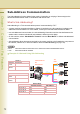

Table Of Contents
- Operating Instructions
- Conventions
- Table of Contents
- Getting To Know Your Machine
- Basic Fax Transmission
- Fax Transmission Procedure
- Entering a Destination
- Transmission with Destination Monitoring
- Talking to the Remote Party Before Transmission
- Setting Original Quality
- Setting the Original Size
- Transmitting 2-Sided Originals
- Verification Stamp
- Transmitting a Document Stored in Memory
- Job Build and SADF
- Direct Transmission
- Verifying Communication Status
- Rotated Transmission
- Batch Transmission
- Getting an Outside Line Using PIN Code Access
- Using Program Keys
- Cancelling a Communication
- Dial Prefix
- Convenient Fax Features
- Fax Reception
- Internet Fax
- What is Internet Fax?
- What Internet Fax Can Do
- Tips for Internet Fax
- Preparing to Use Internet Fax
- Sending an Email Procedure
- Entering an Email Address
- Using Cc, Bcc and From
- Setting a File Type and a File Name
- Emailing an A3-Sized Document
- Setting Message Delivery Notice (MDN)
- When Email Transmission Fails
- Using a Completion Notice
- Receiving an Email
- Receiving an Email on a Computer
- Inbound Routing
- Using the Relay Feature
- Relayed Transmission from Internet Fax
- Relayed Transmission from PC
- Result of Relayed Transmission
- Useful Terms to Remember
- Handling Communication Reservation Files
- Program Destinations/Program Keys
- Reading Reports/Lists
- Solving Problems
- Appendix

72
Chapter 3 Convenient Fax Features
Sub-Address Communication
The Sub-addressing function allows further routing, forwarding, or relaying of document(s) to the
desired destinations when used in combination with Internet Fax.
What is Sub-Addressing?
Sub-addressing is a T.30 communications protocol recommended by ITU-T.
• A centre machine supporting the Memory feature is required on the fax network to implement sub-
addressed communications. For more details, contact your local authorized Panasonic dealer.
• In a sub-addressed communication, the sub-addressing information must be checked between the
sender and the receiver beforehand (sub-address is limited up to 20 digits).
• On this machine, select “Sub Address Transmit” from the “More Menus” to initiate sub-addressed
communication.
• Sub-addressing allows documents received by the centre machine to be forwarded to computers on
the network, Internet fax, or other fax stations. Refer to
Inbound Routing (see page 138).
z ITU-T : International Telecommunication Union-Telecommunication Standardization Sector
z T.30 : Telecommunications standard
Example of a Network Using Sub-Addressing
Sender 2
Telephone
number
2013331234
Sub-
Address
0001
Sender 1
Telephone
number
2013331234
Sub-
Address
2222
Address Book
Telephone number Sub-Address
G3 FAX No. A 0001 2222
G3 FAX No. B 0002 2222
G3 FAX No. C 0003 0001
0002
No. B
No. C
Tel:
0001
0003
Centre Machine
Tel:
2013331234
No. A