
Digital Colour Imaging Systems Operating Instructions
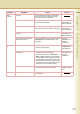
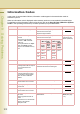
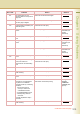
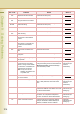
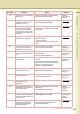
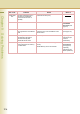

Table Of Contents
- Operating Instructions
- Conventions
- Table of Contents
- Getting To Know Your Machine
- Basic Fax Transmission
- Fax Transmission Procedure
- Entering a Destination
- Transmission with Destination Monitoring
- Talking to the Remote Party Before Transmission
- Setting Original Quality
- Setting the Original Size
- Transmitting 2-Sided Originals
- Verification Stamp
- Transmitting a Document Stored in Memory
- Job Build and SADF
- Direct Transmission
- Verifying Communication Status
- Rotated Transmission
- Batch Transmission
- Getting an Outside Line Using PIN Code Access
- Using Program Keys
- Cancelling a Communication
- Dial Prefix
- Convenient Fax Features
- Fax Reception
- Internet Fax
- What is Internet Fax?
- What Internet Fax Can Do
- Tips for Internet Fax
- Preparing to Use Internet Fax
- Sending an Email Procedure
- Entering an Email Address
- Using Cc, Bcc and From
- Setting a File Type and a File Name
- Emailing an A3-Sized Document
- Setting Message Delivery Notice (MDN)
- When Email Transmission Fails
- Using a Completion Notice
- Receiving an Email
- Receiving an Email on a Computer
- Inbound Routing
- Using the Relay Feature
- Relayed Transmission from Internet Fax
- Relayed Transmission from PC
- Result of Relayed Transmission
- Useful Terms to Remember
- Handling Communication Reservation Files
- Program Destinations/Program Keys
- Reading Reports/Lists
- Solving Problems
- Appendix
214
Chapter 9 Solving Problems
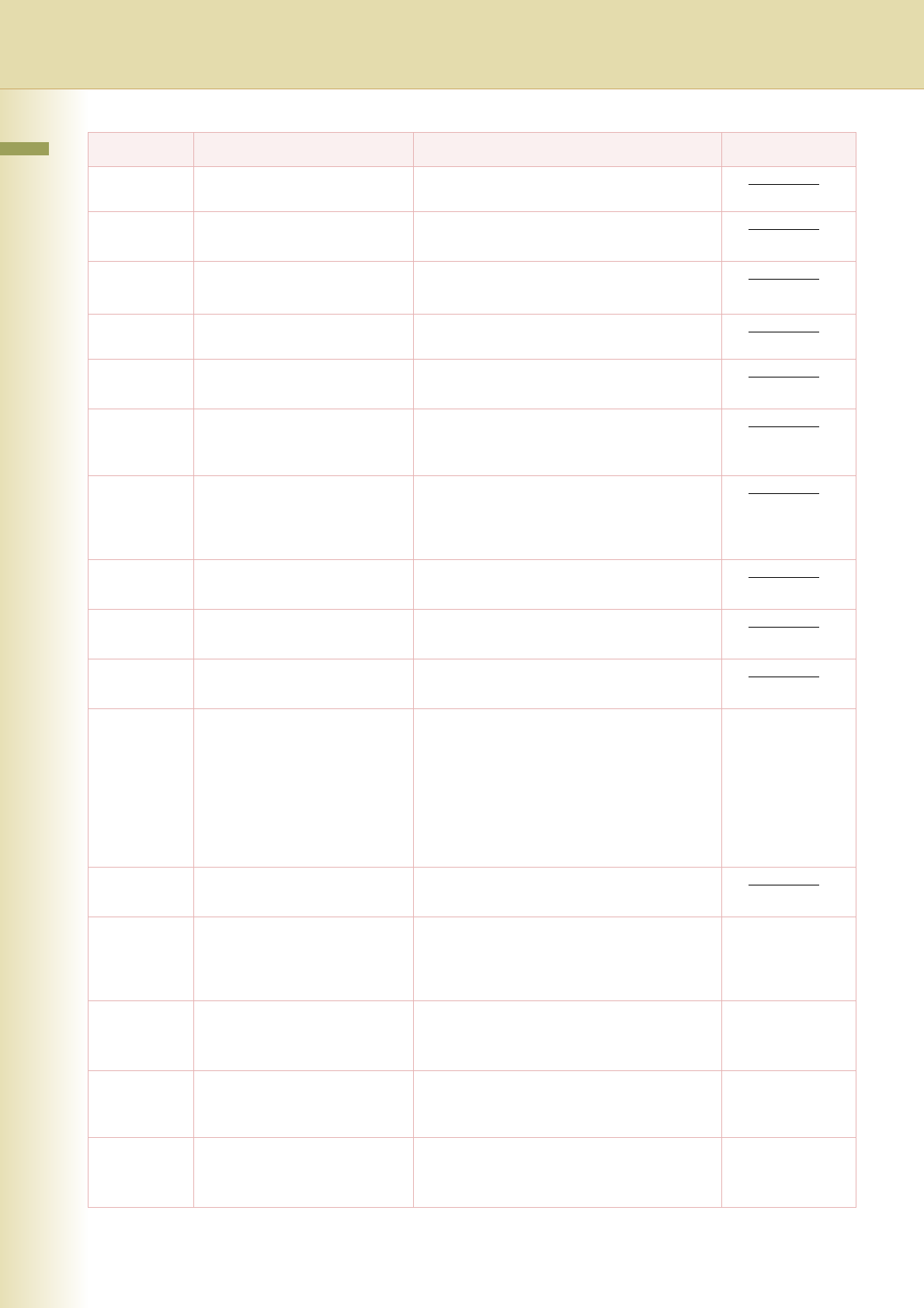
495 Telephone line disconnected. Check with the other party.
501/502/503/
504
Communication error occurred
using the internal V.34 modem.
Check with the other party.
540/541/542/
543/544
Communication error occurred
while transmitting.
Reload the document and send again.
Check with the other party.
550 Telephone line disconnected. Check with the other party.
552/553/554/
555
Communication error occurred
while receiving.
Check with the other party.
580 Sub-address transmission to a
unit that has no Sub-address
function.
Check the remote station.
581 Sub-address Password
transmission to a unit that has
no Password Sub-address
function.
Check the remote station.
623 No document is loaded in the
ADF.
Resend the documents.
630 Redial was not successful due to
a busy line.
Reload the document and send again.
631/700 During dialling, the Stop key
was pressed.
Reload the document and send again.
634 Redial was not successful due to
no response from the called
station or wrong number dialled.
If a dial tone is not detected, the
machine does not transmit.
Note: If busy tone was not
detected, the machine will
only redial once.
Check the telephone number, and send again.
Change the setting of the Function Parameter
“68 Dial Tone Check” (Fax/Email Settings >
Fax Parameters) to “Off”.
Operating
Instructions (For
Function
Parameters)
638 Power failure occurred during
the communication.
Check the power cord and plug.
711 Incorrect LDAP settings Check the LDAP server name, LDAP log-in
name, LDAP password, and LDAP search
base.
Operating
Instructions (For
Function
Parameters)
712 Incorrect Email address Check the registered Email address.
Check the IP Address of the SMTP server with
the network administrator.
Operating
Instructions (For
Setting Up)
714 Cannot log on to the LAN. Check the 10Base-T/100Base-TX cable
connection. An unexpected LAN problem
occurred. Contact the network administrator.
Operating
Instructions (For
Setting Up)
715 TCP/IP connection timed out. Check the Internet Fax parameter settings.
Verify the IP Address, Default Gateway IP
Address, and SMTP server IP Address.
Operating
Instructions (For
Setting Up)
Info. code Problem Action Refer to