
Digital Colour Imaging Systems Operating Instructions
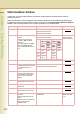
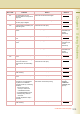
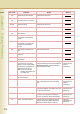
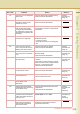
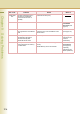
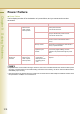
Table Of Contents
- Operating Instructions
- Conventions
- Table of Contents
- Getting To Know Your Machine
- Basic Fax Transmission
- Fax Transmission Procedure
- Entering a Destination
- Transmission with Destination Monitoring
- Talking to the Remote Party Before Transmission
- Setting Original Quality
- Setting the Original Size
- Transmitting 2-Sided Originals
- Verification Stamp
- Transmitting a Document Stored in Memory
- Job Build and SADF
- Direct Transmission
- Verifying Communication Status
- Rotated Transmission
- Batch Transmission
- Getting an Outside Line Using PIN Code Access
- Using Program Keys
- Cancelling a Communication
- Dial Prefix
- Convenient Fax Features
- Fax Reception
- Internet Fax
- What is Internet Fax?
- What Internet Fax Can Do
- Tips for Internet Fax
- Preparing to Use Internet Fax
- Sending an Email Procedure
- Entering an Email Address
- Using Cc, Bcc and From
- Setting a File Type and a File Name
- Emailing an A3-Sized Document
- Setting Message Delivery Notice (MDN)
- When Email Transmission Fails
- Using a Completion Notice
- Receiving an Email
- Receiving an Email on a Computer
- Inbound Routing
- Using the Relay Feature
- Relayed Transmission from Internet Fax
- Relayed Transmission from PC
- Result of Relayed Transmission
- Useful Terms to Remember
- Handling Communication Reservation Files
- Program Destinations/Program Keys
- Reading Reports/Lists
- Solving Problems
- Appendix
212
Chapter 9 Solving Problems
Information Codes
In the event of communication failures, information codes appear in the transmission result or
transaction journal.
When an information code is displayed, take necessary action as recommended in the table below.
For definitions of the information code not found here, refer to the User (U)/Jam (J)/Machine (E) Error
Codes in the Operating Instructions (For Basic Operations) of provided booklet.
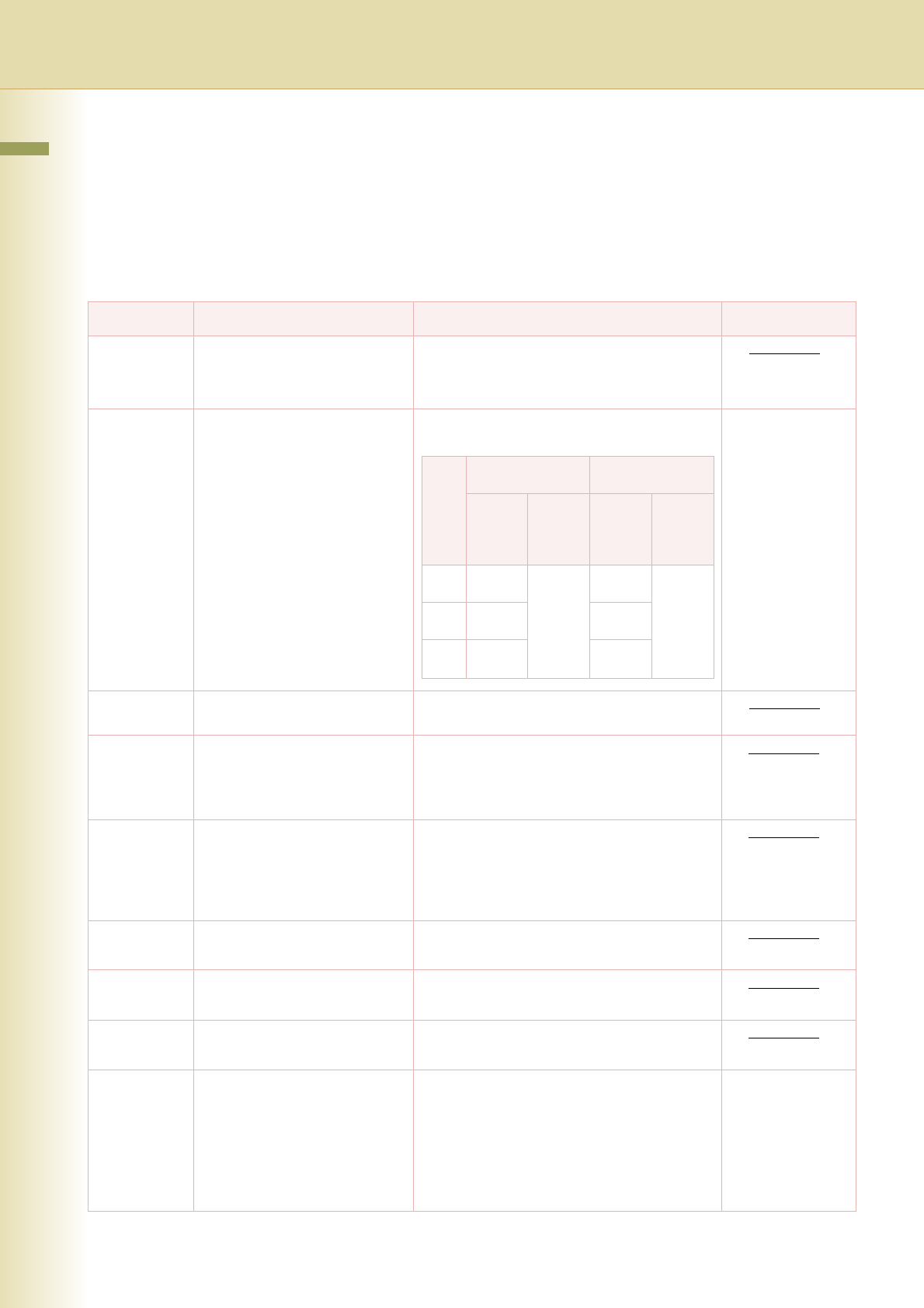
Info. code Problem Action Refer to
030 Document is misfeeding. Reload the document properly.
Remove the document jam.
Adjust the Original Guides.
031 Document is too long or
jammed.
Document length exceeds
2 meters in “Std” and “Fine”
mode only.
The length limitation for “Super
Fine” and “600dpi” mode is
subject to the available memory
size.
Reload the document properly.
Remove the document jam.
Operating
Instructions (For
Basic Operations)
061 ADF Cover is open. Close the ADF Cover.
400 During initial handshake,
receiving station did not respond
or a communication error
occurred.
Check with the other party.
Reload the document and send again.
401 Remote station required a
receiving password to receive
the document. Remote station
does not have Confidential
Mailbox.
Check the remote station.
402 During initial handshake,
communication error occurred.
Reload the document and send again.
403 No polling capability at the
remote side.
Ask remote side to set to be polled.
404/405 During initial handshake,
communication error occurred.
Reload the document and send again.
406 Transmission password does
not match.
Receiving password does not
match.
Received from an unauthorized
station in the Selective
Reception mode.
Check the password or telephone number in
Address Book.
Editing Address
Book (See page
177)
600dpi
(Max. Length)
Super Fine
(Max. Length)
2-Sided
(Long
Edge)
2-Sided
(Short
Edge)
1-Sided
2-Sided
(Long
Edge)
2-Sided
(Short
Edge)
1-Sided
A3
486 mm
(19 in)
1387 mm
(54 in)
730 mm
(28 in)
1387 mm
(54 in)
B4
577 mm
(22 in)
866 mm
(34 in)
A4
684 mm
(26 in)
1027 mm
(40 in)