
Digital Colour Imaging Systems Operating Instructions

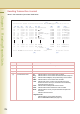
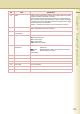
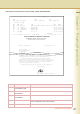
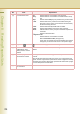

Table Of Contents
- Operating Instructions
- Conventions
- Table of Contents
- Getting To Know Your Machine
- Basic Fax Transmission
- Fax Transmission Procedure
- Entering a Destination
- Transmission with Destination Monitoring
- Talking to the Remote Party Before Transmission
- Setting Original Quality
- Setting the Original Size
- Transmitting 2-Sided Originals
- Verification Stamp
- Transmitting a Document Stored in Memory
- Job Build and SADF
- Direct Transmission
- Verifying Communication Status
- Rotated Transmission
- Batch Transmission
- Getting an Outside Line Using PIN Code Access
- Using Program Keys
- Cancelling a Communication
- Dial Prefix
- Convenient Fax Features
- Fax Reception
- Internet Fax
- What is Internet Fax?
- What Internet Fax Can Do
- Tips for Internet Fax
- Preparing to Use Internet Fax
- Sending an Email Procedure
- Entering an Email Address
- Using Cc, Bcc and From
- Setting a File Type and a File Name
- Emailing an A3-Sized Document
- Setting Message Delivery Notice (MDN)
- When Email Transmission Fails
- Using a Completion Notice
- Receiving an Email
- Receiving an Email on a Computer
- Inbound Routing
- Using the Relay Feature
- Relayed Transmission from Internet Fax
- Relayed Transmission from PC
- Result of Relayed Transmission
- Useful Terms to Remember
- Handling Communication Reservation Files
- Program Destinations/Program Keys
- Reading Reports/Lists
- Solving Problems
- Appendix
198
Chapter 8 Reading Reports/Lists
(6) Communication result “OK” indicates that the communication was successful.
“Busy” indicates that the communication has failed because of busy
line.
“Stop”
indicates that the
Stop
key was pressed during communication.
“P-OK” indicates that memory overflow occurred while storing the
documents into the memory for transmission but successfully
stored document(s) was sent.
“R-OK” indicates that the Relayed XMT was successful.
“B-OK” indicates that the Batch transmission was successful.
“M-OK” Indicates that the memory reception/ substitute reception was
successful.
“- -” indicates LAN transmission.
“3-digit Info Code”
indicates that the communication has failed.
Refer to Information Codes (see page 212).
In this case, the machine will print the attached report with the
first page of your document as shown on the previous page.
(7)
Key name or mark
mark indicates dialling by direct number dialling.
(8) Recorded name in the
Address Book, direct
dialling number, or Email
address
Recorded name in the Address Book, direct dialling number, or Email
address
(9) Number of pages
transmitted or received
The 3-digit number is the number of pages successfully transmitted or
received.
When the documents are stored into the memory, two 3-digit numbers will
appear. The first 3-digit number represents the number of pages successfully
transmitted. The second 3-digit number represents the total number of pages
that were attempted to be transmitted.
(10) Duration of
communication
Duration of Communication
No. Item Explanation