
Digital Colour Imaging Systems Operating Instructions
Table Of Contents
- Operating Instructions
- Conventions
- Table of Contents
- Getting To Know Your Machine
- Basic Fax Transmission
- Fax Transmission Procedure
- Entering a Destination
- Transmission with Destination Monitoring
- Talking to the Remote Party Before Transmission
- Setting Original Quality
- Setting the Original Size
- Transmitting 2-Sided Originals
- Verification Stamp
- Transmitting a Document Stored in Memory
- Job Build and SADF
- Direct Transmission
- Verifying Communication Status
- Rotated Transmission
- Batch Transmission
- Getting an Outside Line Using PIN Code Access
- Using Program Keys
- Cancelling a Communication
- Dial Prefix
- Convenient Fax Features
- Fax Reception
- Internet Fax
- What is Internet Fax?
- What Internet Fax Can Do
- Tips for Internet Fax
- Preparing to Use Internet Fax
- Sending an Email Procedure
- Entering an Email Address
- Using Cc, Bcc and From
- Setting a File Type and a File Name
- Emailing an A3-Sized Document
- Setting Message Delivery Notice (MDN)
- When Email Transmission Fails
- Using a Completion Notice
- Receiving an Email
- Receiving an Email on a Computer
- Inbound Routing
- Using the Relay Feature
- Relayed Transmission from Internet Fax
- Relayed Transmission from PC
- Result of Relayed Transmission
- Useful Terms to Remember
- Handling Communication Reservation Files
- Program Destinations/Program Keys
- Reading Reports/Lists
- Solving Problems
- Appendix
140
Chapter 5 Internet Fax
Settings for Inbound Routing
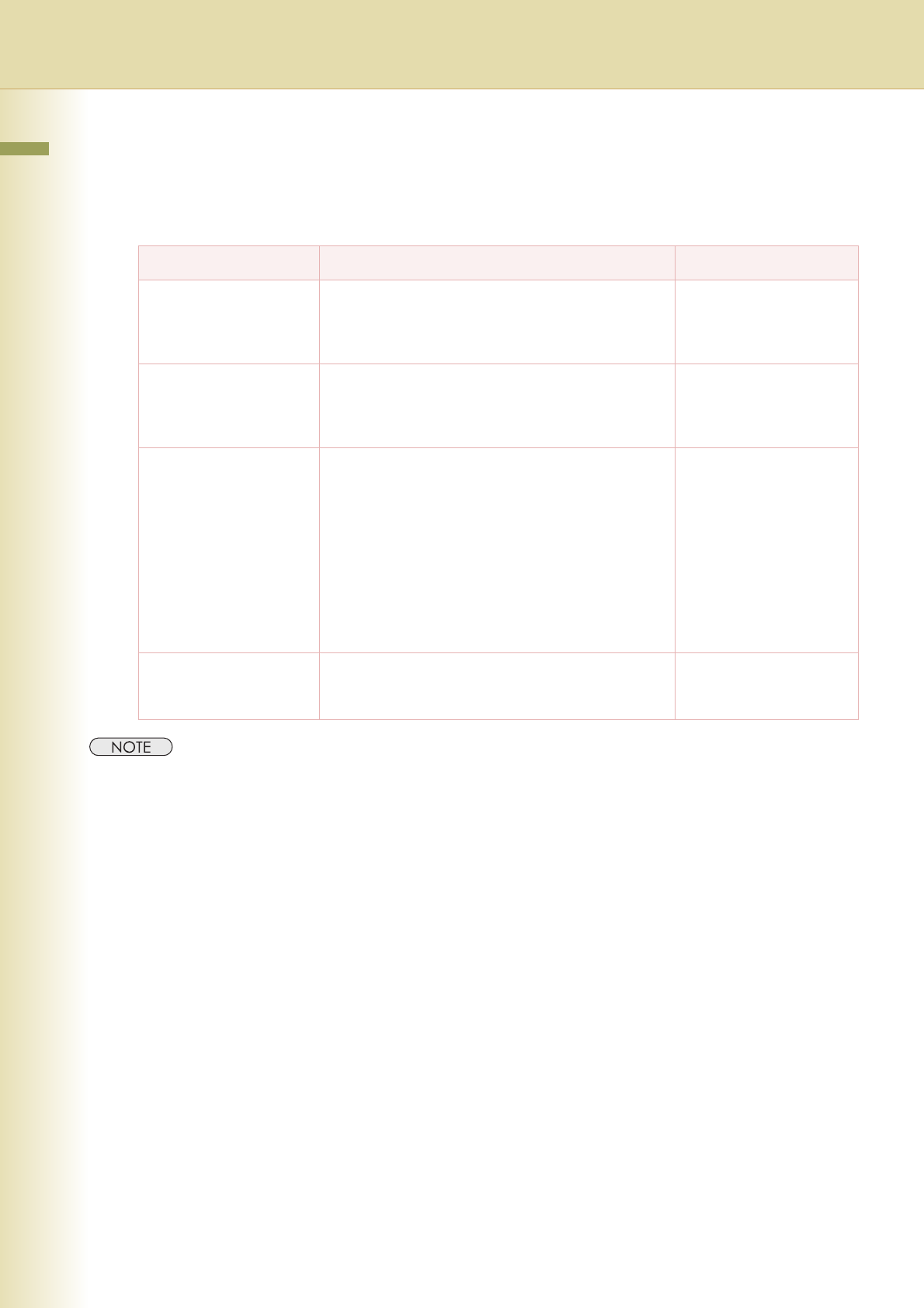
To use the Inbound Routing feature, program the following parameters to meet the type of routing in
Function Parameters (Fax/Email Settings > Fax Parameters):
z For more operational details, refer to Fax/Email Settings in the Operating Instructions (For Function
Parameters) of provided CD-ROM.
Routing type Explanation Function Parameters
Routing by sub-
addressing
Set this parameter to perform an ITU-T sub-address
query within its auto dialler, and to route the received
document(s) to corresponding stations Email
address(s) or telephone number(s).
Set “152 Sub-Addr
Routing” to “Valid”.
Routing by the numeric ID
of a sending fax station
Set this parameter to perform a numeric ID (TSI frame
information) query within its auto dialler, and to route
the received document(s) to the corresponding
stations Email address(s) or telephone number(s).
Set “153 TSI Routing” to
“Valid”.
To set the From field Use this parameter to select the type of Email header
to be included in the “From” field of each routed faxes.
Originator (Origi):
The originating fax machine’s TSI will appear in the
“From” field of the routed Email.
Relay Station (Rly Stn):
The routing station’s Email address will appear in the
“From” field of the routed Email.
Program “154 Route
Header FMT”.
To program printout of
received documents
Select whether to print all documents received on this
machine (“Always”), or print them only if inbound
routing fails (“Inc Only”).
Program “155 Print
Routed Doc”.