
Printer/Fax/Scanner/Copier Operating Instruction
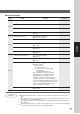
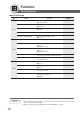
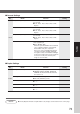
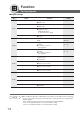


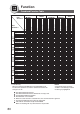
Table Of Contents
- Getting To Know Your Machine
- Before Starting
- Making Copies
- Function
- Accessories
- Network Scanner (Option)
- Problem Solving
- Others
- Specifications
- DP-3530/4530/6030 (Copier)
- i-ADF (Standard)
- System Console 1 (DA-DS603)
- System Console 2 (DA-DS604)
- 3000-Sheet Tray (LCT) (DA-MA301)
- Letter-R/Legal Size Adaptor for LCT (DA-TK31)
- 2-Bin Finisher (DA-FS600)
- 2-Bin Saddle-Stitch Finisher (DA-FS605)
- Punch Unit (DA-SP31)
- 2-Bin Finisher (DA-FS330)
- 1-Bin Saddle-Stitch Finisher (DA-FS355A)
- Punch Unit (DA-SP41)
- Options and Supplies
- INDEX
- Specifications
75
Function
■ Printer Settings
Screen
No.
00 Job Completion Time Sets the job completion time setting. 180
● 1~ 999 sec.
01 Page Protection Compress automatically then printout. Off
● Off, On
02 Error Page Print Sets the error page printout. Off
● Off, On
03 Spool Function Sets the spool function. On
● Off, On
04 Text Print Prints text page only. On
● Off, On
05 PS Configuration Print Prints the PS status page. Start
● Stop, Start
06 Printer Settings Print Prints the printer status.
● Stop, Start
07 Font List Print (PCL) Prints the PCL font list.
∗
Start
● Stop, Start
08 Font List Print (PS) Prints the PS font list.
∗
Start
● Stop, Start
09 Mailbox Data Holding Sets the automatic holding period of mailbox 7 days
data.
∗
● Infinity, 1 day, 2 days, 3 days, 4 days, 6 days,
7 days
10 Delete Mailbox Data Deletes the mailbox data.
∗
Before
● All, Before
11 Print Queue Delete Sets the delete authorization for the print queue. Key op.
● Free, Key op. (operator)
12 AppleTalk Zone Name Inputs an AppleTalk Zone name.
∗∗
● Maximum 32 characters
13 NetWare Sets the NetWare Operating System. On
● Off, On (When using IPX/SPX protocol of
Novell NetWare)
Modes Function
Initial
Setting
01/03
02/03
03/03
NOTE
● The Key Operator ID Code is required before any changes can be made to items on this
page.
∗
Functions No. 07 to 10 are available when the following options are installed.
Function No. 07: Printer Controller Module (DA-PC602)
Function No. 08: Multi Page Description language Controller Module (DA-MC600)
Functions No. 09 and 10: Hard Disk Drive (DA-HD60)
∗∗
When Function No. 12 is set, cycle the power by turning the Power Switch on the Left Side of
the machine OFF and ON.