
Printer/Fax/Scanner/Copier Operating Instruction
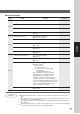
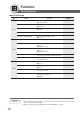
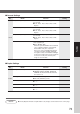
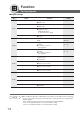


Table Of Contents
- Getting To Know Your Machine
- Before Starting
- Making Copies
- Function
- Accessories
- Network Scanner (Option)
- Problem Solving
- Others
- Specifications
- DP-3530/4530/6030 (Copier)
- i-ADF (Standard)
- System Console 1 (DA-DS603)
- System Console 2 (DA-DS604)
- 3000-Sheet Tray (LCT) (DA-MA301)
- Letter-R/Legal Size Adaptor for LCT (DA-TK31)
- 2-Bin Finisher (DA-FS600)
- 2-Bin Saddle-Stitch Finisher (DA-FS605)
- Punch Unit (DA-SP31)
- 2-Bin Finisher (DA-FS330)
- 1-Bin Saddle-Stitch Finisher (DA-FS355A)
- Punch Unit (DA-SP41)
- Options and Supplies
- INDEX
- Specifications
72
Function
For Key Operator
■ General Settings
Screen
No.
30 Sleep/Shutdown Select Selects the Sleep/Shutdown mode. Sleep
● Sleep, Shutdown
31 Print General Settings Sets the print of general function.
● Stop, Start
32 Corona Wire Cleaning Sets the corona wire cleaning.
● Off, On
33 MAC Address Indicates the MAC address.
34 Address Book Group ID Inputs group ID for address book. 0
● 0 ~ 99
35 Tandem User Parameter Inputs parameter of user machine.
36 Community Name (1) Selects to change the SNMP of Community
Name (1).
∗
● Enables read only.
37 Community Name (2) Selects to change the SNMP of Community
Name (2).
∗
● Enables read/write.
38 Device Name Inputs the device name when necessary.
∗
(For Status Monitor/EtherTalk Machine Name)
39 Device Location Inputs the device location when necessary.
∗
(For Status Monitor)
40 Daylight Time Sets the daylight time. No
● No, Yes
41 Routing Menu Function Selects the Document Distribution function
∗∗
.No
● No, Yes
42 Doc. Dist. Server Name Inputs the Document Distribution System
routing server name.
43 Doc. Dist. Server IP Inputs the Document Distribution System 0. 0. 0. 0.
routing server IP address.
● 3 digits x 4
Modes Function
Initial
Setting
07/10
09/10
08/10
NOTE
∗
When Functions No. 36 to 39 are set, cycle the power by turning the Power Switch on the Left
side of the machine OFF and ON.
∗∗
When the optional Document Distribution System (DA-WR10) is installed.