
Printer/Fax/Scanner/Copier Operating Instruction

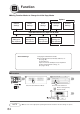

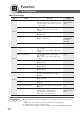
Table Of Contents
- Getting To Know Your Machine
- Before Starting
- Making Copies
- Function
- Accessories
- Network Scanner (Option)
- Problem Solving
- Others
- Specifications
- DP-3530/4530/6030 (Copier)
- i-ADF (Standard)
- System Console 1 (DA-DS603)
- System Console 2 (DA-DS604)
- 3000-Sheet Tray (LCT) (DA-MA301)
- Letter-R/Legal Size Adaptor for LCT (DA-TK31)
- 2-Bin Finisher (DA-FS600)
- 2-Bin Saddle-Stitch Finisher (DA-FS605)
- Punch Unit (DA-SP31)
- 2-Bin Finisher (DA-FS330)
- 1-Bin Saddle-Stitch Finisher (DA-FS355A)
- Punch Unit (DA-SP41)
- Options and Supplies
- INDEX
- Specifications
68
Function
■ Scanner Settings
Screen
No.
00 Original Mode Default Sets the original setting. T/P
● Text, T/P (Text/Photo), Photo
01 Compression Mode Def. Sets the default compression mode setting. JBIG
● MH, MR, MMR, JBIG
02 Resolution Default Sets the default resolution setting. 600dpi
● 150dpi, 300dpi, 600dpi
03 Job Bulid And SADF Mode Sets the SADF mode setting. No
● No, Yes
04 Bind Edge 2-Side Orig. Sets the bind position, 2-Sided original setting. Long
● Long, Short
05 Add New Address To add a new address.
∗
06 Edit Address Book To edit the address book.
∗
07 Delete Address To delete an address.
∗
08 Scanner Settings Print To print scanner settings print. Start
● Stop, Start
09 XMF File Type Sets the default XMF File Type. PDF
● TIFF, PDF
Modes Function
Initial
Setting
01/02
02/02
∗
Address Book is not necessary to set in this function setting, your PC can be registered with Panasonic-DMS.
(See page 84)