
Printer/Fax/Scanner/Copier Operating Instruction

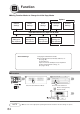

Table Of Contents
- Getting To Know Your Machine
- Before Starting
- Making Copies
- Function
- Accessories
- Network Scanner (Option)
- Problem Solving
- Others
- Specifications
- DP-3530/4530/6030 (Copier)
- i-ADF (Standard)
- System Console 1 (DA-DS603)
- System Console 2 (DA-DS604)
- 3000-Sheet Tray (LCT) (DA-MA301)
- Letter-R/Legal Size Adaptor for LCT (DA-TK31)
- 2-Bin Finisher (DA-FS600)
- 2-Bin Saddle-Stitch Finisher (DA-FS605)
- Punch Unit (DA-SP31)
- 2-Bin Finisher (DA-FS330)
- 1-Bin Saddle-Stitch Finisher (DA-FS355A)
- Punch Unit (DA-SP41)
- Options and Supplies
- INDEX
- Specifications
67
Function
■ Copier Settings
Screen
No.
00 Margin Value Default Selects the margin shift value. 10 mm
● 5 mm, 10 mm, 15 mm, 20 mm
01 Edge Value Default Selects the edge width. 5 mm
● 5 mm, 10 mm, 15 mm, 20 mm
02 Book Value Default Selects the book void width. 20 mm
● 15 mm, 20 mm, 25 mm, 30 mm
03 Margin Reduction Def. Selects the reduction ratio in margin mode. No
● No, Yes
04 2-Sided Mode Default Function sets the duplex priority mode. No
● No, 1 to 2, 2 to 2, B to 2 (B: Book)
05 Reduce N in 1 For Space Selects whether to disable edge deletion. No
● No, Yes
06 Digital Skyshot Mode Enables or disables the use of Skyshot mode. Freeshp
● No, Freeshp (Freeshape), Parallel
07 Manual Skyshot Mode Enables or disables the use of Manual Skyshot. Off
● Off / M1, On / M2, On / M1, M2, On
08 Auto Contrast Adjust Automatically adjusts the copy density for text Yes
and photographic originals.
● No, Yes
09 N in 1 Default Mode Selects the N in 1 default mode. 2 in 1
● 2 in 1, 4 in 1, 6 in 1
11 Booklet Default Mag. Selects the booklet magnification. Reduce
● 1, Reduce
12 Sort Mode Def. ADF Copy Selects the sort mode. Sort
● Non-Sort, Sort, Stplsort (Staple-Sort),
Sftgroup (Shift-Group)
13 Sort Mode Def. FB Copy
∗
Selects the sort mode. Non-Sort
● Non-Sort, Sort, Stplsort (Staple-Sort),
Sftgroup (Shift-Group)
14 Staple Position Setting Selects the staple position. Portrait
● Landscap (Landscape), Portrait, Center
15 Stamping Default Mode Selects the stamping mode. Page
● Page, Date, Issue
16 Page Numbering Style Selects the page numbering style. -n-
● -n-, n/m
17 Hole Punch Default Enables the hole punch mode. Off
● Off, On
18 Img. Repeat Dotted Line Selects the dotted line. Print
● None, Print
19 Double Exposure Selects the double exposure. On
● Off, On
24 Key Operator Mode Input Key Operator ID code.
Modes Function
Initial
Setting
01/05
02/05
03/05
04/05
∗
FB: Platen
05/05