
Printer/Fax/Scanner/Copier Operating Instruction

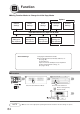

Table Of Contents
- Getting To Know Your Machine
- Before Starting
- Making Copies
- Function
- Accessories
- Network Scanner (Option)
- Problem Solving
- Others
- Specifications
- DP-3530/4530/6030 (Copier)
- i-ADF (Standard)
- System Console 1 (DA-DS603)
- System Console 2 (DA-DS604)
- 3000-Sheet Tray (LCT) (DA-MA301)
- Letter-R/Legal Size Adaptor for LCT (DA-TK31)
- 2-Bin Finisher (DA-FS600)
- 2-Bin Saddle-Stitch Finisher (DA-FS605)
- Punch Unit (DA-SP31)
- 2-Bin Finisher (DA-FS330)
- 1-Bin Saddle-Stitch Finisher (DA-FS355A)
- Punch Unit (DA-SP41)
- Options and Supplies
- INDEX
- Specifications
66
Function
■ General Settings
Screen
No.
00 Power On Default Mode Selects mode. COPY
● COPY, PRINTER, SCANNER
∗
, FAX
∗
01 Manual Add Toner Adds toner manually. Off
● Off, On
02 Sort Memory Status Indicates the sorting memory status. Off
● Off, On
03 Departmental Counter Indicates the department counter.
Consult with an
authorized service
provider
04 Key Operator Mode Input the Key Operator ID Code.
Modes Function
Initial
Setting
01/01
∗
When the optional Network Scaner Module/Fax
Communication Board is installed.