
Printer/Fax/Scanner/Copier Operating Instruction
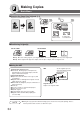
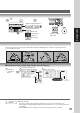
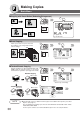
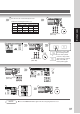
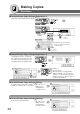
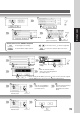
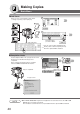
Table Of Contents
- Getting To Know Your Machine
- Before Starting
- Making Copies
- Function
- Accessories
- Network Scanner (Option)
- Problem Solving
- Others
- Specifications
- DP-3530/4530/6030 (Copier)
- i-ADF (Standard)
- System Console 1 (DA-DS603)
- System Console 2 (DA-DS604)
- 3000-Sheet Tray (LCT) (DA-MA301)
- Letter-R/Legal Size Adaptor for LCT (DA-TK31)
- 2-Bin Finisher (DA-FS600)
- 2-Bin Saddle-Stitch Finisher (DA-FS605)
- Punch Unit (DA-SP31)
- 2-Bin Finisher (DA-FS330)
- 1-Bin Saddle-Stitch Finisher (DA-FS355A)
- Punch Unit (DA-SP41)
- Options and Supplies
- INDEX
- Specifications
35
Making Copies
Adjust the Manual Exposure
or
Select type of Original(s)
Mainly Text
Text and Photo
combined
Mainly Photo
Number of Copies
(Max. 999)
NOTE
● Memory Capacity:
If memory overflows during original scanning, the message “Cannot Complete / Job
Exceeds Memory Capacity” will be displayed on the LCD. If this occurs, follow the instructions
on the LCD.
When additional memory is required, consult with an authorized service provider.
■ Copying on Heavy Paper (Post Cards, etc.) (35 lb max.)
Load paper
on the Sheet
Bypass
Select Sheet Bypass and
touch the Size Change button
3
4
Select Heavy Paper
3 4
1 2 3
4
When copying a thick Booklet, open the ADF and verify that the ADF Hinge was returned to original position if the
rear of the ADF was raised.